2

I have a template from CentOS 7 (1602) that I have deployed roughly 200 VMs using it until I noticed the issue, so it would be ideal to fix these VM's rather than start from scratch.

The VM's 'randomly' fail, usually between 7PM and 11PM, sometimes two nights in a row, sometimes not for a week or two. When one VM fails, most of them also fail. They seem to loose disk access. Rebooting the VM immediately solves the issue and it does not reoocur for at least 24 hours. Even when we don't reboot them till the next day they still reboot during this time period.

Some of the VM's have nothing installed on them and still have this issue. Root partition and boot partition are hardly used. Logs show no issues.

No other VMs are affected except this particular centos template. We are using VMWare 4 (I know, I know) but we have never had any issues other than this and new images have no issue. I see no spikes in CPU or disk use in VMWare around the failure.

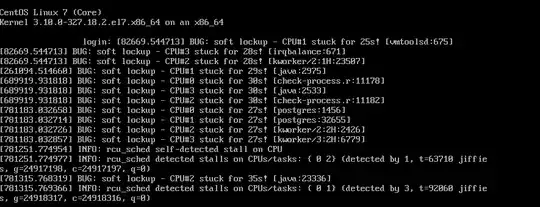
Here is a screenshot as it fails:
OnFailure

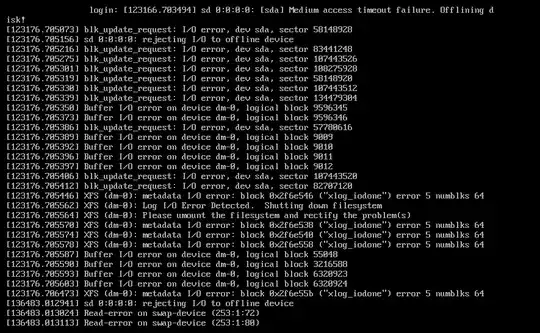
Here is a screenshot when trying to access the VM after a number of minutes has elapsed:
AfterFailure

Example bootstrap script used on these servers: http://pastebin.com/gs3AzV5m

ewwhite
  • 201,205
ZZ9
  • 936

1 Answers1

1

This is probably due to OS support or a resource issue. EL7 was not intended for use with vSphere 4. The VMware support matrix reinforces this.

enter image description here

I see you're using open-vm-tools, but it looks like you may have a deeper issue.

See: https://access.redhat.com/solutions/21849
and: https://kb.vmware.com/selfservice/microsites/search.do?language=en_US&cmd=displayKC&externalId=1009996

On running RHEL as a Virtual Machine under VMWare, the "soft lockup" messages might indicate high levels of overcommitment (especially memory overcommitment) or other virtualization overheads.

200 VMs is a large number, and vSphere 4 is an old release. I couldn't imagine starting a new rollout on such an old release of vSphere, and I'm sure you're no longer under VMware support.

  • What does the infrastructure and cluster setup look like?
  • How many hosts?
  • What are the hosts' resources? RAM amount? CPU type/count?
  • What type of storage?
  • What is the vCPU and RAM profile of these VMs?

Are you heavily overcommitted to the point where your system is killing itself?

ewwhite
  • 201,205