17

I am working on a server within my office. The server will eventually be relocated to a data center. I would like to be able to leave the server switched on in my office, which means I would like to be able to protect it from power outages or surges. In the office I only have desktop UPSs. I would like to avoid forking out for an expensive server class UPS.

I don't mind if it only has protection for a short time (Even a few minutes would be longer than any likely power drop where I live)

The UPS is APC Back-UPS ES 400 (400 VA, 240 Watts)

The server is DL 360p Gen 8 (750 watt PSUs)

Braiam
  • 652
MrVimes
  • 793

6 Answers6

33

I would not plug a server with a power supply capable of drawing 750 watts into a UPS which is only rated at 240.

The issue isn't really that it's a "server" or "desktop" UPS. You're likely to trigger overload protection and drop your server even if the power input is fine.

USD Matt
  • 5,411
  • 18
  • 26
17

Your UPS provides power when the utility mains drops, and protects from transient under and over voltage/current conditions.

Given you can plug a desktop or a server or a UPS into the same supply socket, the power is all the same, and what comes out of the UPS is the same.

However the UPS wattage and the PSU ratings are a maximum

You need to know how much power your server draws on each PSU. You can find this information with a Watt Meter ("kill-a-watt" is one brand) or an AC clamp meter, or in your case a good estimate comes from the iLO.
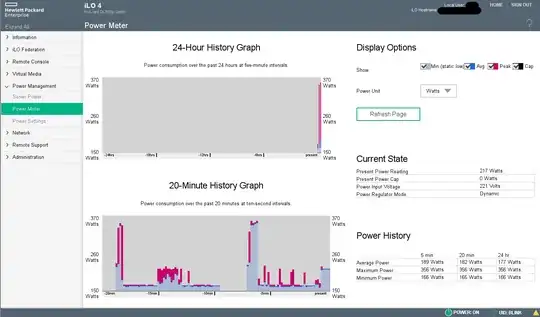
iLO4 power meter image from a HP DL380

The figures on the right side will show you a number in watts, and if its over 240W then your UPS will probably shut down with "OVERLOAD" if the mains goes out, or if the UPS needs to buck or boost.

Mine shows * Peak of 356 Watts which appear to be correlated with booting. * Minimum of 166 Watts * Current value of 217 Watts

I would not run this server off a UPS rated at 240 Watts but your numbers may vary.

If your maximum draw is smaller than 240W you might get 10-30 seconds power out of the UPS. Not really enough time for a safe shutdown assuming you're standing right there.

The backUPS may or may not have a serial or USB port for monitoring, so without that and the powerchute or NUT or apcupsd software, then the server will be going down hard anyway.

Finally you might be buying yourself additional problems. If the power goes out, your UPS will do something, and run itself flat very quickly. Many UPSs will not power on when mains returns, because its better to stay off than to start up with a flat battery and be vulnerable until the charge rises. So a small power blip means you have to go into work to turn the UPS on afterwards.

tl;dr In short, that UPS is probably too small, but do check first.

Your best answer is to get the server into the DC as quick as you can, and then use the iLO to do the setup and installation.

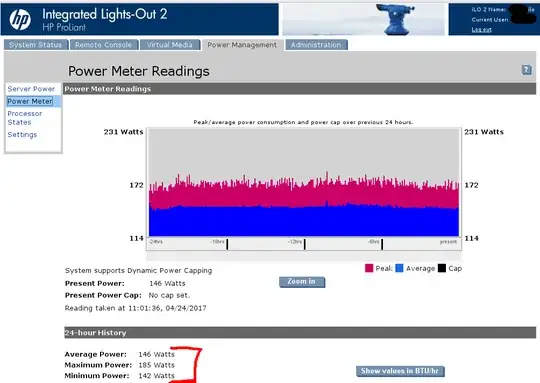
Here's a similar power meter from an older iLO2 equipped server (a HP dl380 G6) This sort of info should be found in any brand-name server that has an OOB interface (out of bandwith management, like cisco's CIMC, IBM's RSA.
enter image description here

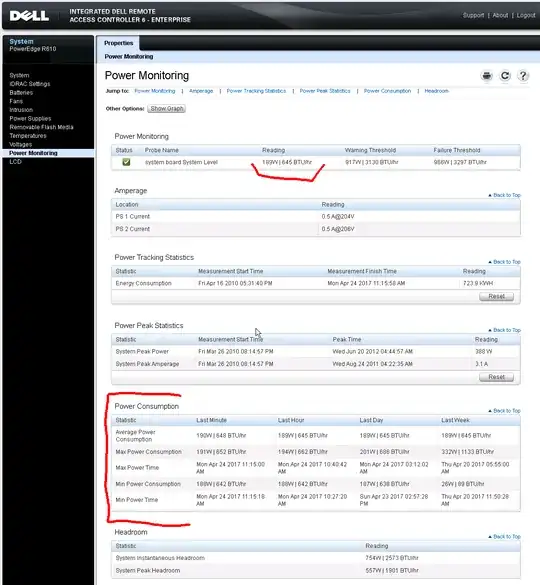
And the same info from the DRAC6 on a Dell r610.
enter image description here

Criggie
  • 2,328
  • 15
  • 27
6

Back-UPS is not suitable for server protection. More or less suitable is the smart-UPS that has a way more sophisticated controller inside. The typical operation cycle for a power supply when the wall power goes out is:

  • If the remaining charge less than 30% the UPS sends a signal to the server to shut down.
  • The server correctly exits all the programs and sends a signal to the UPS "Be ready in 5 minutes" and runs the shutdown command.
  • UPS waits for 5 minutes and powers off the outlet the server is connected to.
  • UPS waits until wall power comes back and starts the battery charging until it is charged to 50%
  • UPS powers on the outlet the server is connected to
  • Server boots and sends a message to the UPS "I'm ready". Until now UPS does not power off the server under any circumstances.
  • If another outage happens during server startup, UPS sends the shutdown command immediately after the "I'm ready" signal is received.
  • Otherwise UPS continues charging
  • The end

Dumb back-UPSs can't do all those tricks.

psmears
  • 340
Kondybas
  • 7,110
1

If the features Kondybas mentions are not required - yes, IF a) the power rating is enough (which is not the case here) and b) there is no regulatory requirement that would forbid using desktop-grade equipment unattended 24/7 - doing so could, depending on locality, violate eg fire insurance requirements or other safety policies. Also, in case of an accident, not meeting condition a) could be interpreted against you as intentionally/negligently overloading electrical equipment...

1

As I dont see mention of that, I will add a note. Highter end UPS will tend to be TrueOnline

Unlike a BackUPS, that when the AC input is lost it switch to the battery power, a True Online UPS always use the battery power in the output outlet.

That mean the AC input is always clear from signal range problem. The input AC always charge the battery. (AVR Trim if the signal is too hight versus AVR Boost if the signal is too low)

The battery live less, but your server will always have a good input.

There in the image you see a example of what I mean, the lower line is the normal's way for a trueonline ups, while the upper way is the bypass mode if you put the UPS in bypass mode.

enter image description here

There an example of the AVR control's I talked about;

enter image description here

yagmoth555
  • 17,495
0

It all depends on the amount of power being drawn. All a server is is a computer. Just keep in mind that most servers are in racks and the power drawn and supplied as a group is much higher than an end-user's requirements would be. A Smart UPS is more likely what you're after. Having said that the power supply in the server should handle the server's specific requirements and the UPS just needs to cover that power supply's top capacity and any likely max jolt you're going to hit on that power line. In other words, if you have a 1500W power supply, then get an UPS that can provide at least that and the UPS needs to be able to handle a power spike of a certain level. Most UPS aren't designed for long-term coverage...simply enough to get done what you need to and then to gracefully shut down the machine.