I collected a brief exchange between an SSL client and server (openssl's s_client and s_server, to be exact), and want to view the ssl portions of the pcap file with tshark. I don't need to decrypt the encrypted portions, but at least would like to know the values in the unencrypted fields.
When copying the file from the server to my desktop I can open the pcap file with Wireshark and see the fields by default:
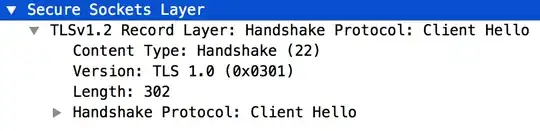
On the other hand, tshark -r tls_dump.pcap only displays up to the TCP portion of the packets. For example, for the same packet:
4 0.000069237 127.0.0.1 → 127.0.0.1 TCP 373 54312 → 44330 [PSH, ACK] Seq=1 Ack=1 Win=43776 Len=307 ...
I tried collecting the packets both with tcpdump -U -i lo 'port 44330' -w tls_dump.pcap and with tshark -nn -i lo -s 0 -w tls_dump.pcap port 44330 (as here), but when trying to view the packets the results are the same.
tshark options I tried:
-2has no effect-2R "ssl"shows nothing-Y "ssl"shows nothing-o "ssl.desegment_ssl_records: TRUE" -o "ssl.desegment_ssl_application_data: TRUE"has no effect-T jsonshows only raw uninterpreted TCP payload data-Vshows only raw uninterpreted TCP payload data--printhas no effect--enable-protocol "ssl"has no effect--enable-heuristic "ssl"gives me aNo such protocol ssl, can't enableerror
How does one output SSL packet details of an SSL packet with tshark?
