41

I'm trying to remove the "Server" header that discloses my IIS version. I'm using IIS Express 10 with ASP.NET Core 3.0 and have developed a Web API. I've tried the options below, but the header is still present in the response and reveals the version: IIS 10.0.

  1. Changed registry key "DisableServerHeader" in HTTP Parameters to 1. It only removed Server header of http.sys module, not the IIS version.

  2. Used the code below in applicationHost.config file in the <system.webServer> tag

    <rewrite>
      <outboundRules rewriteBeforeCache="true">
        <rule name="Remove Server header">
          <match serverVariable="RESPONSE_Server" pattern=".+" />
          <action type="Rewrite" value="" />
        </rule>
      </outboundRules>
    </rewrite>
    
RaJ
  • 511

5 Answers5

49

I tested the trick on this site and it works well on IIS 10.

https://www.saotn.org/remove-iis-server-version-http-response-header/#removeserverheader-requestfiltering-in-iis-10-0

Simple web.config:

<?xml version="1.0" encoding="UTF-8"?>
<configuration>
    <system.webServer>
        <security>
            <requestFiltering removeServerHeader="true" />
        </security>
    </system.webServer>
</configuration>
M.R.T
  • 591
39

There have already been plenty of good answers, but I'd like to show a different approach for users like me, who like to use Windows GUI IIS Management Console "Internet Information Services (IIS) Manager" with the shipped "Configuration Editor".

You'll also avoid crashing your IIS because of badly formatted configuration files, as happened to one of the commenters. The 'Configuration Editor' will apply the changes in the IIS configuration files for you. Also, you can set these settings globally or on a per site manner just as you wish without the need of editing the files manually or applying Powershell/cmd commands.

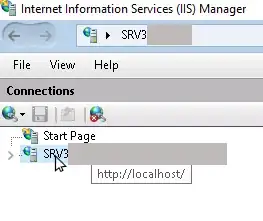
  1. Open "Internet Information Services (IIS) Manager".

  2. If you want to set the settings globally, click on your main server node:

    select iis node

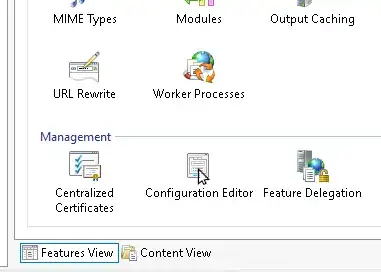
  3. Open the "Configuration Editor"

    open configuration editor

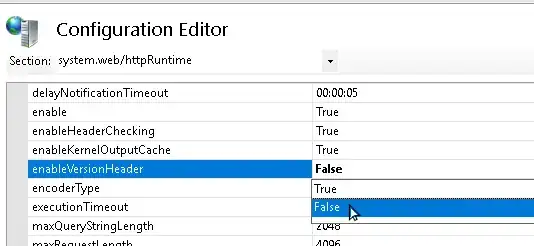
  4. To remove the x-aspnet-version response header, go to system.web >> httpRuntime >> enableVersionHeader and set it to false

    disable server response header

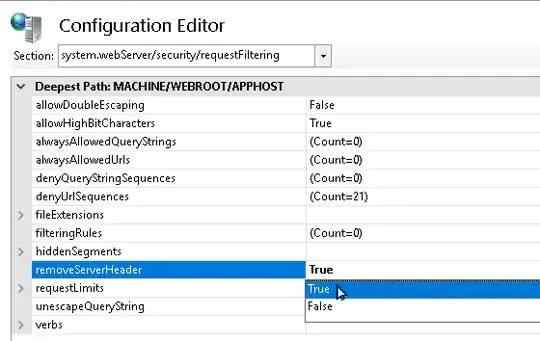
  5. To remove the IIS server response header, go to system.webServer >> security >> requestFiltering >> removeServerHeader and set it to true

    remove IIS server header

For setting the values per site, just click on the site you want to apply the changes, and select the Configuration Editor from there.

AndreasRu
  • 491
8

Run as Administrator:

%systemroot%\system32\inetsrv\appcmd.exe set config -section:system.webServer/security/requestFiltering /removeServerHeader:"True"  /commit:apphost
5

I remembered I've seen this is possible in IIS10, and indeed I blogged about this in New features in IIS 10.

There is a new removeServerHeader setting, but it is not available in the GUI, you have to use the Configuration Editor or use PowerShell:

Set-WebConfigurationProperty -pspath 'MACHINE/WEBROOT/APPHOST'  -filter "system.webServer/security/requestFiltering" -name "removeServerHeader" -value "True"

for the whole server, if you just need it for a site, use:

Set-WebConfigurationProperty -pspath 'MACHINE/WEBROOT/APPHOST/Default Web Site'  -filter "system.webServer/security/requestFiltering" -name "removeServerHeader" -value "True"

This seems to work fine for me, no reboot or restart of IIS is required.

It doesn't affect the http.sys server header in the rare case that it responses to a request.

1

All Above solution works... but here are the Points that need to take care while working for removal of response header in IIS.

Intended to ASP.net Application: Mehtod 1 -

Method - 2 : in webConfiguration Editor try to modify the value for the key ---system.webServer/rewrite/outboundRules rewriteBeforeCache is set to true, otherwise Cache may override the URLRequire or Global.asax settings.

Method 3 - : (in Global.asax File)

protected void Application_PreSendRequestHeaders() 
      {
    // Remove the default Server header
    Response.Headers.Remove("Server");
    // Optionally, add your own Server header
    Response.AddHeader("Server", "My-App/1.0");
    }

Method 4: URL Rewrite which is described above already.

Turdie
  • 2,945