424

I find git hard to understand as I could not find the meaning of the words used for the actions. I have checked the dictionary for the meaning of 'stage' and none of the meanings were related to source control concepts.

What does 'stage' mean in the context of git?

000
  • 4,605

8 Answers8

397

To stage a file is simply to prepare it finely for a commit. Git, with its index, allows you to commit only certain parts of the changes you've done since the last commit.

Say you're working on two features - one is finished, and one still needs some work done. You'd like to make a commit and go home (5 o'clock, finally!) but wouldn't like to commit the parts of the second feature, which is not done yet.

You stage the parts you know belong to the first feature, and commit. Now your commit is your project with the first feature done, while the second is still work-in-progress in your working directory.

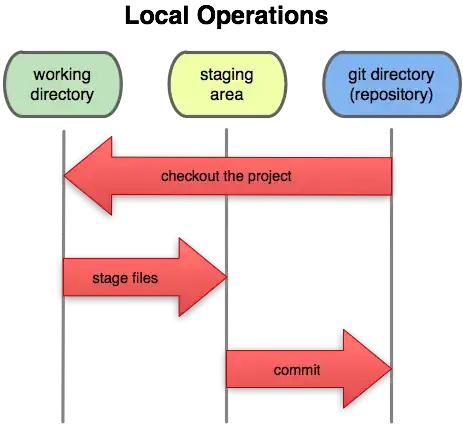
illustration of local operations in a Git repo: between the working directory, the staging area, and the Git directory (repository)

Rook
  • 19,947
164

Since everyone so far has answered it the "formal" way, let me do this with alternatives to enhance learning with the power of metaphors.

So the staging area is like:

  • a cache of files that you want to commit
  • not a series of tubes but actually a dump truck, ready to move the work you load it with, in to the repository
  • a magical place where selected files will be turned into stone with your wizardry and can be magically transported to the repository at your whim
  • the yellow brick road for the files to go happily to the repository (or fall off if you want to revert)
  • the fictional place at the sea port where files are received a pair of cement shoes and then thrown into the repository sea
  • the receptions desk at the library, you put the files there for the librarian to prepare for filing into the library
  • a box where you put things in before shoving it under your bed, where your bed is a repository of boxes you've previously have shoved in
  • the loading bay of files before it goes into the repository warehouse with the power loader
  • the filter of an electric drip coffee maker, if the files are like the coffee powder, then the committed files are the brewed coffee
  • the Scrooge McDuck's office next to the vault, the files are like the coins before they go into the vault of his massive Money Bin
  • the pet store, once you bring a pet home you're committed

It's magical!

alan
  • 103
Spoike
  • 14,771
53

Staging is a step before the commit process in git. That is, a commit in git is performed in two steps: staging and actual commit.

As long as a changeset is in the staging area, git allows you to edit it as you like (replace staged files with other versions of staged files, remove changes from staging, etc.).

Broken metaphor time:

Consider a scenario where you call the movers to get your stuff from your old appartment to your new appartment. Before you do that, you will go through your stuff, decide what you take with you and what you throw away, pack it in bags and leave it in the main hallway. The movers simply come, get the (already packed) bags from the hallway and transport them. In this example, everything until the movers get your stuff, is staging: you decide what goes where, how to pack it and so on (e.g. you may decide that half your stuff will be thrown away before the movers even get there - that's part of staging).

From a technical point of view, staging also supports transactional commits, by splitting all operations into what can fail (staging) and what cannot fail (commit):

The commit in git is implemented transactionally, after the staging is sucessfull. Several steps in the staging can fail (for example, you need to commit, but your HDD is 99.9999% full, and git has no space to perform a commit). This will fail in staging (your repository will not be corrupted by a partial commit) and the staging process doesn't affect your commit history (it doesn't corrupt your repository in case of an error).

utnapistim
  • 5,313
30

To stage a file is to prepare it for a commit. Because git exposes this action to the users control it allows you to create partial commits, or to modify a file, stage it, modify it again, and only commit or revert to the original modification.

Staging allows you finer control over exactly how you want to approach version control.

Josh K
  • 23,029
  • 10
  • 67
  • 100
24

To add to the other excellent answers, here's where the name for "stage" comes from:

I checked the dictionary for the meaning of stage and none of the meanings was related to source control concepts.

In English, "to stage" can mean

organize and participate in (a public event): UDF supporters staged a demonstration in Sofia

(from http://oxforddictionaries.com/definition/stage )

The name "staging" for the git feature derives from this meaning: When staging, you are preparing and organizing a commit. Of course a commit is not quite the same as a performance, but it is an important event in a VCS :-).

sleske
  • 10,280
10

The "stage" is a technically required intermediate step in the process of checking in a file, namely collecting the changes to be added to the repository. Git's authors chose to make this step visible and persistent where other VCS make it a transient part of the commit process. So it's just an option that git gives you because it can so why not?

The way I see it, the main thing the git "stage" gives you that other VCS don't is that you can use it to checkpoint a file. It's effectively an unnamed, uncommented local commit that gives you an intermediate step between being done with all your work and committing it to the repository permanently and having nothing saved in your local repo at all.

For example, let's say you have a feature partially finished. It's in a stable state, passes all the tests, and could go into production, but you have more work to do on it. You could stage all your changes and then continue to work on the feature.

Later, you'll have the option to just commit what you staged (and push that commit to the remote repository) or to add your new changes to your staging area and then commit that all at once, or to undo just your new changes and revert your working directory to the state it was in when you staged your changes.

It's completely possible to practically skip the staging area altogether and just use the -a option to git commit if you don't find the staging area a helpful concept. Lots of people skip staging and GUI tools usually allow for this, too.

Old Pro
  • 813
6

With most other version control systems, there’s 2 places to store data: your working copy (the folders/files that you’re currently using) and the datastore (where the version control decides how to pack and store your changes). In Git there’s a third option: the staging area (or index). It’s basically a loading dock where you get to determine what changes get shipped away.

source: http://gitready.com/beginner/2009/01/18/the-staging-area.html

-1

My understanding is, suppose i am developing login feature and required 5 consecutive steps to complete. So here staging will help you to work on steps like
done with step 1 stage it.
done with step 2 , now step 1 and step 2 both are correct stage it.
mess up with step 3 no problem checkout latest staged step that is step 2
same way once you done with all 5 steps that means feature is complete now perform commit.

palash140
  • 145