8

How does one prevent users from creating erroneous input sets, when there is no practical way to vet the input?

The scene

I modify a small ERP package written in Visual FoxPro. One part of the package concerns itself with printing truck manifests and invoices to be sent with the drivers on their delivery routes. The print routine, when fed nothing as an input, will attempt to print everything, resulting in reams and reams of printer paper being wasted on a high-speed printer.

I am not in a position to re-write any of the GUI interface elements, nor can I adapt any frameworks, tool kits, or other outside code to be used in this situation. The reasons are related to office politics, please do not suggest that I can override the existing ERP framework, as it is not an option for me.

The issue

The users are in a high-pressure, time-critical environment. Each process is measured in minutes or even seconds, which means that I have to minimize processing time as much as possible. Because of this environment, and possible distractions, users frequently ignore the dialogs, pressing the [Enter] key which causes the focus to rapidly move through the form and eventually landing on the action button for the input dialog, resulting in them triggering an automatic printout.

The input consists of a date range, route range, and sales order range.

The input for date range cannot be auto-set to "today's date", as frequent back-printing is required. Also, the end-users work during midnight, i.e. date rollover makes this impractical without rigging a routine that auto-detects the change, etc.

The input for routes cannot be hard-coded, nor can it be deduced from routes that have already been shipped, because re-prints are required (see above).

The input for sales orders only has meaning when printing single orders or specific ranges.

So, frankly, there is no practical way to validate input.

The action button that triggers printing cannot be blocked. Any suggestions that a blocking dialog be placed in front of the user will be ignored. I am not at liberty to discuss why this is not an option, other than the concept has been already discussed elsewhere on the site (from a different vantage point) and was rejected.

Blocking printouts when all inputs are empty was rejected as a design decision as the software must accommodate this as a feature.

The users

The users have been repeatedly asked not to do this. They frequently ignore this advice. Triggering this unfortunate event is not something that their foremen/managers will address, so there is no pressure to end the behavior.

The organization

I do not have a say in the workflow involved, only the modification of existing software components affected by that workflow.

The vendor

The vendor second-sources the package as a custom installation from the original software vendor. The vendor requires that all code changes be sent back to them for integration into their codebase. Significant changes to architecture will result in increased future costs during version migrations due to the extensive customization involved; in some cases, the programmers have even told me that they will completely ignore such large changes and will do as they please.

The software

I have no say in the selection or installation of the software, so changing the platform is out of the question.

Regarding the environment of the software, each invoice printed is a single call. There isn't a batch printing facility, and because of how the print facility is integrated into the system (and some language quirks as well) it isn't feasible to make a batch wrapper around that API. Topping this off, this part of the program calls another program that does the invoice print, which in turn calls the print-a-report API, which prints a single invoice. Horrid design, I know.

Input forms are a weird combination of a form header that is devoid of input boxes, but can contain other GUI elements. Input boxes are defined at runtime.

The objective

The software will prevent the users from erroneously printing all paperwork.

How would you solve this issue?

7 Answers7

27

It sounds to me like you've got a requirement to fix something, but every time you propose a solution (and there are plenty of good ideas in your list) it gets shot down.

This is the point where you need to push back. You don't need a vague idea that "this is wrong; fix it." What you need is a spec. Ask the people who want it fixed exactly what they do want done, since so far all you have is what they don't want. That much is easy: just do nothing, and then you won't do any of the things they don't want. Tell them that if they want changes made, they need to come up with positive, concrete rules and you will implement them.

Mason Wheeler
  • 83,213
25

This is easy, if they leave everything blank you prompt that this will print everything, however, the DEFAULT selection in that prompt MUST be to cancel.

If they enter values, print whatever they asked for.

This way, they won't accidentally blaze through the form and print everything. They'll blaze through and print nothing. They would need to pause, and print change the selection at the prompt to OK, from Cancel, to print everything.

CaffGeek
  • 8,103
10

I'll try to give an answer for a more generic question: how to avoid a user making a mistake which leads to disaster or something which cannot be canceled or undone (like wasting paper by printing several pages the user didn't expect to be printed).

As said in the original question:

The users are in a high-pressure, time-critical environment. Each process is measured in minutes or even seconds, which means that I have to minimize processing time as much as possible.

This means that:

  • The software product must make its best to increase the productivity of the employees. When every second counts, user experience and productivity is even more important than for general products, where a loss of a few seconds on some feature the person don't even use too often is acceptable.

  • The users are too busy to pay attention to the software product. When, in a calm environment, I use some feature of Microsoft Word I used the last time a year ago, if Microsoft Word asks me a question, explaining what would be the consequences of my choice, I can afford spending a minute or two reading the question, and maybe even going to read the documentation. In your case, you can't afford that. Your users don't have time to read.

Message boxes: no, no and... no!

As already explained in my other answer, message boxes are evil in most cases, for two reasons (see About Face 3 by Alan Cooper for more details):

  • The dialog that cried “Wolf!” principle incite the user to dismiss repeatedly a dialog without paying attention if the application shows the same dialog too often.

  • The dialog disturbs the workflow: the user can't stay focused on the application, because the dialog grabs this focus away and the interaction with the application is suspended until the dialog is dismissed¹.

This means that dialog boxes are an absolute evil in your case from the UX point of view: they will be dismissed and they will decrease productivity in an environment where every second counts.

Other means

According to the question:

  • "The input consists of a date range, route range, and sales order range."

  • There are no wrong values (for example the user can enter a previous date, a future date or today in the first field), so validation is not possible.

  • "The print routine, when fed nothing as an input, will attempt to print everything, resulting in reams and reams of printer paper being wasted on a high-speed printer."

  • It's totally possible to ask to print with default data used.

In more generic terms, it means that:

  • You have a default value, which can actually be valid,

  • You don't want the users to hit "Print" button with default values kept by mistake, while they intended to change them.

Here's a few techniques you can try:

1. The magic undo

Yes, the users are in a time-critical environment. Yes, once the printer starts printing, it cannot be stopped. But there is still something you can do.

Even in a time-critical environment, chances are that printing right now and printing in five seconds will not change anything.

When the user clicks "Print", display a small "Undo" button, just like GMail does when you ask to remove, by mistake, all your mail. Wait for five seconds². Hide the "Undo" and only after that, print.

Now, the user has a chance to notice the mistake and cancel it before the harm is actually done, while the stuff is printed only with a small five seconds delay.

2. The discrete "default value" background

Is having default values suspicious?³ With one value, it's rarely suspicious. With three, there are chances that the cases when the user has to keep all three values by default are quite rare.

In this case, you can:

  • Highlight the value when it has its default value. Not in red: red is for invalid values. Set it to yellow-orange, and back to white when the user alters the default value.

  • Or disable the "Print" button until a value is changed. Add a checkbox nearby, which the user can check to confirm that his intent is to print with default values.

3. Enhance the UI of your controls

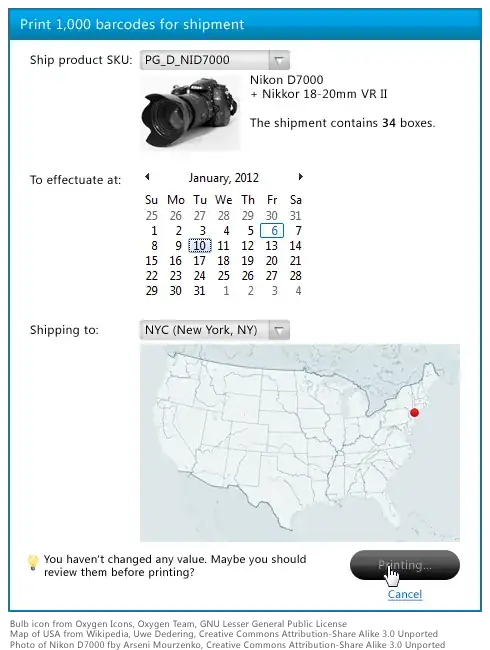
We are Friday, 6th of January 2012 today. What will be the date the next Thursday? Quick, quick, you're under pressure, you have only one second for your answer. Also, you're tired and there is a lot of noise all around. Not easy to answer, isn't it?

People can't manipulate dates easily when it's written as 1/8/1012. Saturday, 7th of January (tomorrow) is a bit easier. A graphical view which highlights Saturday and Sunday, shows today and the offset is even better.

Nothing is as ugly as "Location: NYC". Those three letters are meaningless when you're tired and work in a stressful environment; mistakes are easy. Instead, a graphical map of United States showing a red dot for New York city is much more appealing, and the user has much more chances to notice that, while he wanted to select San Francisco, the red dot seems to appear in a wrong place.

enter image description here

Would you enjoy if your GPS told you that you have to move from 38.90403, -77.04878 to 38.90568, -77.04665, then turn right and move to 38.90565, -77.04345, then turn 90° left and move to 38.90660, -77.04345? Would you be able to concentrate on your work (the road)? Showing 1/8/2012 and NYC to busy users is as friendly as a GPS that throws raw coordinates instead of a 3D view of a map full of color.

By providing richer controls and richer visualization of data, you can decrease the level of mistakes of your users in a stressful environment.


¹ This, by the way, applies to other variants of dialog boxes. You previously asked a question about the dialog boxes where the buttons will be random and which will make it difficult to dismiss. Sadly, such approach will not help, but only hurt: the users will still dismiss what is said by the dialog, but waste more time trying to close it to return back to work.

² I say five seconds as an example. You have to monitor the activity of the users for a few months to see how fast they click on "Undo". Chances are it will be below one second. If you see that the delay is from 0.6 to 1.8 s. with an average of 1.1 s., you can show the "Undo" for two seconds, and then print.

³ Please, please, please, say no! Because if it is, it means that there is something wrong with your default values. For example if the default value for the date is today, while in 75% of cases, the users have to set it to tomorrow, in 10% to yesterday, and in 10% to the day after tomorrow, you should rather set the default value to tomorrow.

3

How would you solve this issue?

Clearly separate the use cases. There's a "print something right now" case that can lead to endless output. Fix this to provide all the right defaults.

There's a "reprint some previous thing" case that is a special (non-standard) request where inputs can be checked carefully.

The input for date range cannot be auto-set to "today's date", as frequent back-printing is required.

False.

The input can be auto-set today with no effect at all on frequent back-printing requests.

What possible impact would a auto-set to "today's date" have on back-printing requests? Please enumerate them in the question.

The input for routes cannot be hard-coded, nor can it be deduced from routes that have already been shipped, because re-prints are required (see above).

False.

Reprints and back-prints are a special case. They never have default fields and are the exception, not the rule.

S.Lott
  • 45,522
  • 6
  • 93
  • 155
3

Can you determine before printing how many pages will be printed, or in some other way measure the size of the output? If so, determine a maximum size for normal use, and if it is bigger, use a confirm dialog that states the output size and, so it cannot be dismissed without reading, requires the user to type back the output size to confirm.

JGWeissman
  • 1,061
  • 8
  • 12
2

You have a situation where the current process default is creating waste and costing time for your users.

Disable the ability to just hit enter all the way though by having the focus on the "reset parameters" button(create one if needed) so if they hit enter it stays on that screen, but does nothing. I would create some sort of hot buttons for the most common selections to auto fill the form with those parameters to help the users out. But this should solve your problem even with out the hot buttons.

SoylentGray
  • 3,104
2

Allow me to restate the problem.

Present state: blindly pressing Enter causes reams of paper to be printed.

Desired state: blindly pressing Enter does not cause reams of paper to be printed.

Solution: change the software so that blindly pressing Enter does something, anything, other than causing reams of paper to be printed.

That pretty much leaves you with the problem of what it should do instead. Personally, I would ask the operators what they want. My guess is something like printing the most urgent invoices that haven't already been printed. Leave the ability to print all, but require a conscious decision to do so.

Karl Bielefeldt
  • 148,830