43

I recently learned that when merging two branches in git, if there are changes on two adjacent lines git declares this a conflict. For example, if file test.txt has this content:

Line 1: A
Line 2: B
Line 3: C
Line 4: D

and in branch master we change this to

Line 1: A
Line 2: B1
Line 3: C
Line 4: D

while in branch testing we change this to

Line 1: A
Line 2: B
Line 3: C1
Line 4: D

and then attempt to merge testing into master, git declares a merge conflict. My naive expectation was that the merge would happen without conflict and yield this:

Line 1: A
Line 2: B1
Line 3: C1
Line 4: D

I am sure there is a good reason why git doesn't merge this way. Can someone explain this reason?

rlandster
  • 999

4 Answers4

17

Is this git-only behavior?

After discussion with a colleague, I just tried, and SVN handles it without problem: you get the 2 lines modified.

The merge capabilities of several VCS are tested here for bazaar, darcs, git and mercurial: https://github.com/mndrix/merge-this

It seems only darcs successfully merge the "adjacent lines" case.

Applying adjacent changes to files is not a difficult problem. I really think this behavior has been chosen on-purpose.

Why would someone decide that modifying adjacent lines produces a conflict?

I would think this is to force you to look at it.

int max = MAX_ITEMS;
for(unsigned int i = 0; i < max; i++)
    do_stuff(i);

Modif number 1, on master:

int max = MAX_ITEMS/2; // Do stuff only on the first half
for(unsigned int i = 0; i < max; i++)
    do_stuff(i);

Modif number 2, merged from a branch:

int max = MAX_ITEMS;
for(unsigned int i = 0; i < max/2; i++) // max/2: only on 1st half
    do_stuff(i);

After merge, you don't want that:

int max = MAX_ITEMS/2; // Do stuff only on the first half
for(unsigned int i = 0; i < max/2; i++) // max/2: only on 1st half
    do_stuff(i);

Seeing this behavior as a feature

You can turn the git merging behavior to an advantage. When you need to keep 2 lines consistent but you can't detect it (at compilation time, early in your tests or else), you can try to join them.

Rewrite this...:

for(unsigned int i = 0; i < max; i++)
    r = do_stuff(i);
    // Need to do something else
    do_something_else(r);

...to this:

for(unsigned int i = 0; i < max; i++)
    r = do_stuff(i);
    do_something_else(r); // Need to do something else

So when you merge Modif 1...:

for(unsigned int i = 0; i < max; i++)
    r = do_stuff(i)/2; // we need only the half
    do_something_else(r); // Need to do something else

... with Modif 2...:

for(unsigned int i = 0; i < max; i++)
    r = do_stuff(i);
    if(r < 0) // do_stuff can return an error
        handle_error(r);
    do_something_else(r/2); // Need to do something else

..., git will produce a conflict, and you will force you to look at it.

ofaurax
  • 473
13

Assuming that this snippet of code

x=0
x+=1 if foo
x+=1 if bar
return x

has been changed in one branch into this

x=0
x+=1 if foo && xyzzy
x+=1 if bar
return x

and in another branch into this

x=0
x+=1 if foo
x+=1 if bar && xyzzy
return x

then I would not want git to merge it into this

x=0
x+=1 if foo && xyzzy
x+=1 if bar && xyzzy
return x

without alarming me.

In order to avoid causing such problems, git usually refuses to automatically merge changes touching nearby lines. It gives you a chance to verify whether the program logic would be broken or not.

This example is trivial, but when merging huge branches the risk of similar "logical" conflicts is much bigger. Sometimes I would even love the context to be even bigger than it currently is.

Arsen7
  • 255
13

The other answers here are all on point, but to me this always seemed like an unnecessary limitation.

As others have said, in these cases you definitely wouldn't want Git to merge the lines without warning.

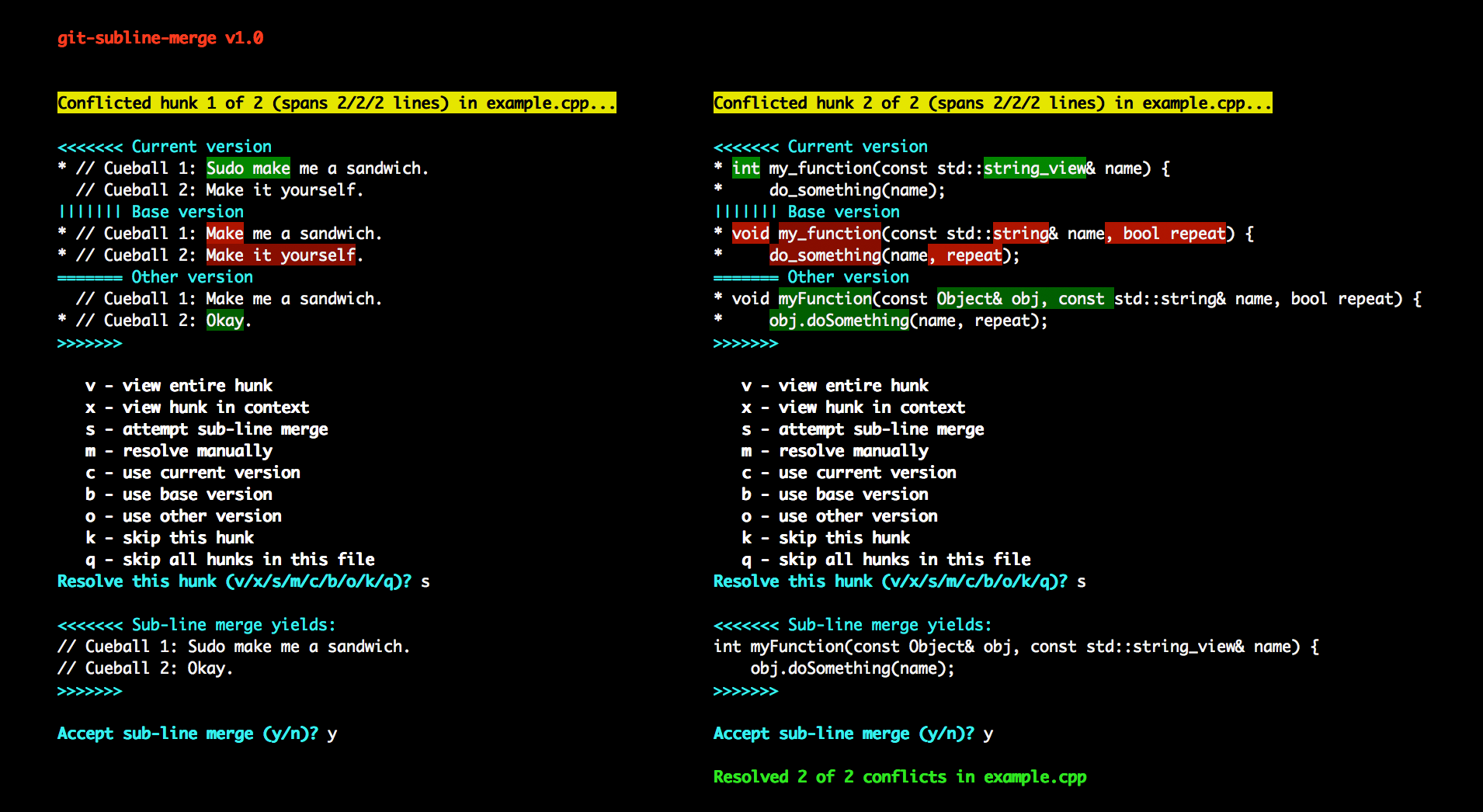
But I still wanted the option to do it automatically, after being warned. So I wrote a custom git merge driver that could merge conflicts on adjacent (or individual) lines interactively:

enter image description here

It saves me a huge amount of time, as I manage a project where people are often working on the same files and refactoring lots of code.

The script is available on GitHub under a GPLv3+ license. Maybe you'll find it useful:

https://github.com/paulaltin/git-subline-merge

deltacrux
  • 247
6

I'm mostly guessing, but I think it has to do with line 2 being used as context for the line 3 change.

Git can't just say that "The line with C became a line with C1" because there could be another line with "C", so it says "The line with C, that's right after the start of the file, the line with A, and the line with B, is now C1"

If "the line with B" is no longer there, then some of the context is lost, and git can only tell roughly where the new line has to go.