82

What I think about Build Numbers is that whenever a new nightly build is created, a new BUILDNUMBER is generated and assigned to that build. So for my 7.0 version application the nightly builds will be 7.0.1, 7.0.2 and so on. Is it so? Then what is the use of a REVISION after the build number? Or is the REVISION part being incremented after each nightly build? I am a little confused here... do we refer to each nightly build as a BUILD?

The format is mentioned here: AssemblyVersion - MSDN

gnat
  • 20,543
  • 29
  • 115
  • 306
A9S6
  • 943

12 Answers12

83

I've never seen it written out in that form. Where I work, we are using the form MAJOR.MINOR.REVISION.BUILDNUMBER, where:

  • MAJOR is a major release (usually many new features or changes to the UI or underlying OS)
  • MINOR is a minor release (perhaps some new features) on a previous major release
  • REVISION is usually a fix for a previous minor release (no new functionality)
  • BUILDNUMBER is incremented for each latest build of a revision.

For example, a revision may be released to QA (quality control), and they come back with an issue which requires a change. The bug would be fixed, and released back to QA with the same REVISION number, but an incremented BUILDNUMBER.

AminM
  • 193
tcrosley
  • 9,621
31

The whole confusion stems from the different semantics that MS uses for "Build number" and especially "Revision". The terms just mean different things.

Most people (myself included) use a semantic version numbering scheme where you just get a higher BUILD number whenever you have to make a new build for whatever reason. For us, a hotfix is considered just another code change, and the BUILD part increases automatically with every CI run. Modules with same MAJ.MIN.REV are considered interchangeable, and the BUILD tells you which one is the most recent.

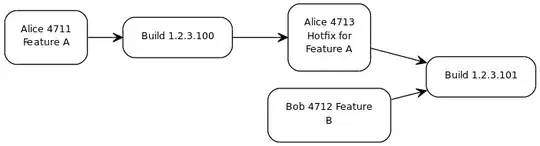
Incrementing REVISION, however, indicates a new permanent release branch, that's why we place it before BUILD. The downside of that approach is, that we might get the following sequence of events:

  • commit number 4711: Alice added feature A
  • CI produces build 1.2.3.100
  • commit number 4712: Bob modified feature B
  • commit number 4713: Alice fixed feature A (the "hotfix")
  • CI produces build 1.2.3.101

major.minor.revision.build

As you can see, the hotfix is not the only change contained in the next build, also Bob's modification become part of that build. If you want to stabilize the current branch, you may run into troubles as you never can't be sure whether or not Bob just added a bunch of bugs.

MS uses both terms differently. The BUILD number is not automatically incremented, instead it can be considered being kind of a release branch, to freeze the code used for a particular version of the code. The REVISION indicates additional "hot" changes applied to that BUILD branch. The sequence would therefore be as follows:

  • commit number 4711: Alice added feature A to trunk/master
  • Carl creates build branch 1.2.100
  • CI produces build 1.2.100.0
  • commit number 4712: Bob modified feature B in trunk/master
  • commit number 4713: Alice fixed feature A in the 1.2.100 branch
  • CI produces build 1.2.100.1

major.minor.build.revision

The term REVISION may refer to

  • a product revision (that's how most people use it)
  • a revision of a particular daily build (that's what MS does)

The key difference between the two processes is, whether or not you want the ability to apply hotfixes to CI builds and thus, at which point in the process the branch is made. This aspect becomes important when you want to be able to pick a particular build at any time after all the tests succeeded and promote exactly that version to the next official release of your product.

In our case the CI tool creates a repository tag, so we always have the necessary information ready to use, when needed. With SVN it becomes even simpler, because tags and branches are implemented exactly in the same way - a tag is nothing more than a branch located under /tags.

See also

From the FAQ section at TFS branching strategy:

In what branch should I fix the P1 (hotfix) ticket?

  • The P1 should be fixed in the branch that is closest to the code base running in Production. In this case the P1 should be fixed in the Prod branch. By applying the fix in any other branch and rolling out the changes to production you risk releasing semi-finished or untested code from the subsequent iterations.

  • Now you may argue if it is safe to work directly against the Prod branch, think again, a P1 that requires immediate attention should not be a fundamental problem in the system. In case it is a fundamental problem it should be added to the Product backlog as it may require further analysis and discussion with the customer.

Another good read is the TFS branching guide

JensG
  • 2,473
22

Microsoft describes the purpose of each component of a .NET version number in their MSDN documentation for the Version class. Here is the relevant portion:

major.minor[.build[.revision]]

The components are used by convention as follows:

Major: Assemblies with the same name but different major versions are not interchangeable. A higher version number might indicate a major rewrite of a product where backward compatibility cannot be assumed.

Minor: If the name and major version number on two assemblies are the same, but the minor version number is different, this indicates significant enhancement with the intention of backward compatibility. This higher minor version number might indicate a point release of a product or a fully backward-compatible new version of a product.

Build: A difference in build number represents a recompilation of the same source. Different build numbers might be used when the processor, platform, or compiler changes.

Revision: Assemblies with the same name, major, and minor version numbers but different revisions are intended to be fully interchangeable. A higher revision number might be used in a build that fixes a security hole in a previously released assembly.

Quote from https://learn.microsoft.com/en-us/dotnet/fundamentals/runtime-libraries/system-version

See also http://msdn.microsoft.com/en-us/library/system.version.aspx

4

There are at least a couple different things that I could imagine the build number referencing:

  1. Source control version that was release. For example if there was a release of revision #12345, this may be tracked by having it be the build number and if it is patched that is where revisions may go up as it isn't new functionality that would increase the major or minor versions and the build number has to be remembered in case someone wants to run that build again.

  2. Continuous integration server Identifier. In this case, the CI server may number each build it runs and thus the build number is what a successful build gets and the revision part isn't needed in this scenario.

There may be others that I don't know, but these are the big ones that I know when it comes to numbers on code bases.

JB King
  • 16,775
3

A build number is usually incremented at every build so it is unique.

For simplicitys sake, some reset the build number whenever the MAJOR or MINOR numbers are bumped.

Most Continuous Integration engines allow for autogenerated unique build numbers.

2

Let me just say how I see and use it....

ProgramName version major.minor.build.revision

major: For me is the current project I am working on. The number will not change until I start a new project of the same program name. This means I will literally be writing a new program of the same gender (example: access v1 - access v-2 - access v-3 * all the same program but completely rewritten).

minor: This means I am adding functionality to the current published project. For example maybe I added the ability to print a receipt or added the ability to import pictures. Basically additional functionality I want to add now and not wait for the next major release to do it.

build: This I use to indicate very small changes in the published major.minor version. This could be a change in the layout, colour scheme, etc.

revision: This I use to indicate a bug fix in the current published major.minor.build - There are occasions where I am not progressing the current project and a bug arises. This bug needs to be fixed and published. It just means I am fixing what I already published to work properly. I would also use this if I am working on a new build, a new addition or started a new major version. The published version obviously needs to be patched while we are waiting for the next major, minor or build release.

So in this manner a finished or stalled project can still be fixed and made useable until the next release is published.

I hope this gives someone a better understanding of how this type of versioning would (or should) work. To me it is the only definition and practice that makes any type of real sense when using this type of versioning.

2

The revision can be used for patches of the builds. Lets say that 2 teams work on a product.

Team 1 is the major development team and produces nightly build with the following version schema 1.0.X.0, where X is incremented. Now they are at build 1.0.50.0 Team 2 is taking a build from time to time. Let's say they take the build from last week which is 1.0.43.0 and start using it. Team 1 advances to 1.0.51.0 when team 2 finds an issue in 1.0.43.0.

Now team 1 will take that build (43), fix the issue and provide team 2 with the build 1.0.43.1. The fix might be also propagated in the main build, so the change will appear in 1.0.52.0.

Hope this is clear and helpful.

*Revision is useful when not everyone involved in the project uses the same build and you need to patch specific builds.

1

I've only ever seen a build number as the last number in the release ID. I'm not sure how you'd come up with a revision to a build number. I suppose if you changed some of the non-built resources (icons, DB script, etc), maybe, but most projects I've worked on recently have all that stuff under version control as well, so the build process picks them up when making the installer/release. I like time-stamped build numbers, although not quite as @David describes (I like major.minor.revision.HHMM). However, where I work, we just use a sequential number that our build server generates.

TMN
  • 11,383
0

Our team uses the third number (revision) as the revision number from the Subversion repository. We use the fourth number (build) as the build number from our TeamCity continuous integration server which actually creates the build. TeamCity creates a new AssemblyInfo file with the right #s in it during the build process.

RationalGeek
  • 10,077
0

Like jkohlhepp, we use the third part of the version to show the revision number in SubVersion and the fourth to show the build number from our continuous integration server (Jenkins for us). This gives us a several benefits - having the version number set by our CI server removes a manual step that could otherwise be accidentally missed; it's easy to check that a developer hasn't done a cheeky release from their development PC (which would result in these numbers being zero); and it allows us to tie any piece of software back to both the code that it was generated from and the CI job that built it, just by looking at the version number - which we occasionally find very useful.

0

I'm surprised nobody seems to have mentioned this. Whether a good idea or not, I've seen projects use the automagic build+release version numbering that MS provides. And what that does (is non-reproducible builds):

The AssemblyVersionAttribute attribute allows you to specify an asterisk (*) in place of the build or revision number. A version number such as [assembly:AssemblyVersion("1.2.*")] specifies 1 as the major version and 2 as the minor version, and accepts the default build and revision numbers. A version number such as [assembly:AssemblyVersion("1.2.15.*")] specifies 1 as the major version, 2 as the minor version, and 15 as the build number, and accepts the default revision number. The default build number increments daily. The default revision number is the number of seconds since midnight local time (without taking into account time zone adjustments for daylight saving time), divided by 2. If you specify an asterisk for the build number, you can't specify a revision number.

Important

Use of the AssemblyVersionAttribute attribute that specifies an asterisk:

  • Makes the build outputs non-reproducible (see Reproducible builds). If the project sets Deterministic build property to true an error CS8357 is reported by the compiler.
  • Might degrade build performance, as it prevents build from caching compiler outputs.
  • Is incompatible with the Edit & Continue and Hot Reload features.

So that rather suggest MS wants to deprecate this automagic, but they didn't quite do it. OTOH they do say:

A better approach to versioning is to derive the assembly or file version from the HEAD commit SHA (for git repositories). See, for example, Nerdbank.GitVersioning.

By the way, the paras quoted by Cole Campbell's answer no longer appear in the current MS documentation at the link that answer provided. (The link is still valid, but suggestions about how to use those numbers are no longer in that API reference page.)

-1

It is whatever you want it to be. I tend to use year.month.day.hhmm for my major.minor.build.revision. If I'm producing more than one a minute, something's wrong. you can just use a simple increment, or I've seen some elaborate generators for them. What do you want it to be. What they need to do is make it so you get to the source used to create that output, so whatever enables you to do that.

BlackICE
  • 2,425