75

Sometimes in apps I look into the Resources and find files for, for example, a 256x256 version, a 128x128 version, a 64x64 version, AND a 32x32 version, of the same icon. When I see simple geometric icons like circles I already wonder why they do not just use SVG, but on top of that, what is the purpose of storing an original icon in addition to progressively lower quality versions of the same icon? Storing the smaller icons does not even save space because the full size icons are being stored anyway.

For example in Roblox Studio the @2x and @3x images are just higher resolution versions of basically the same icon:

Example

Why do that?

CPlus
  • 1,209

4 Answers4

207

Image scaling isn't necessarily free

Modern processors are fast, but they're not magic, and everything that needs calculating on the fly uses up resources that could be better spent elsewhere. Similarly, if you load a large image into RAM (not to be confused with storage), or transmit it over a network, and then rescale it to one which only needs 1MB, you've wasted that 4MB of memory or bandwidth.

In the case of icons, this is generally negligible, but it could add up for a large number of images.

More importantly, image scaling is not always easy

Scaling a bitmap down means throwing away part of the image data, but trying to keep the "look" of the image. For some images, that's trivial - throw away every other pixel in a large block of colour, and you have an identical block of colour, but smaller. For some, it requires a smarter algorithm - a curved line will look jagged if you just drop pixels, but blurred if you over-use anti-aliasing.

For some images, it is better to simply redraw from scratch. To produce an icon at a very low resolution, an artist might take the original design and drop irrelevant details, straighten up curves and slanted lines, and so on. Notably, even storing a vector image such as an SVG would not give as good a result in these cases.

For a nice example of this, here are the 8 sizes of icons embedded in the LibreOffice Writer executable on Windows, which have clearly been hand-drawn at each size (form left to right, 16x16, 22x22, 24x24, 32x32, 48x48, 64x64, 128x128, and 256x256):
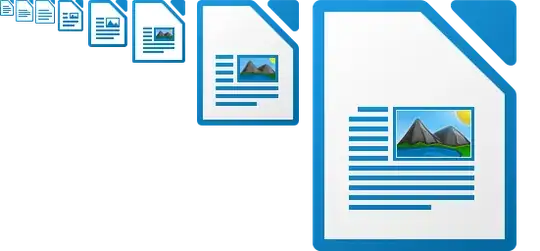
LibreOffice icons at actual size

Here is what each would look like if simply scaled down to the smallest size (16x16):

LibreOffice icons scaled to 16x16

And here they are all scaled to 64x64 (the actual size of the sixth one along):

LibreOffice icons scaled to 64x64

Special cases require effort

As you pointed out, some applications have very simple icons which could be made to look fine with automatic scaling. However, if some icons are stored at multiple resolutions, it's much easier to code the application or framework assuming that all icons will be stored at those resolutions. It's also easier to tell designers to always give you a series of icon files at the appropriate sizes, and name them in a standard way, leaving it up to them how much time to spend optimising each one.

IMSoP
  • 5,947
16

It's often so that you can display differently sized versions of an icon without having to go through the process of scaling down to smaller sizes.

The smaller versions may have been tweaked to make them easily recognisable, while an automatically scaled one could be fuzzy or pixelated.

Simon B
  • 9,772
11

For images over many magnitudes of scale, programs will store multiple resolutions in an efficient format https://en.wikipedia.org/wiki/Pyramid_(image_processing)

One use case: for high resolution maps, it would require not only lots of computation but an impossible amount of bandwidth to transmit the full resolution of a map, so when zoomed out lower detail tiles are presented, then when zooming in these are replaced with higher definition tiles.

Another use case is for reducing aliasing artifacts and speeding up computation is using mipmaps. The basic idea is that lower resolution textures are used for further away graphics.

mipmaps

Credit: User BillyBob CornCob on Wikimedia

The original description of mipmaps by Lance Williams in 1983 used a neat trick to store images with 3 channels, usually RGB such as in JPEG images, into one square using a recursive pattern. Here is the beautiful hand-drawn diagram from the paper:

recursive rgb

There are advantages and disadvantages to using a single image file for multiple resolutions: a single file is better for filesystems and can image compression algorithms can potentially compress better when all data is one file, but there is a little computation needed to extract the relevant resolution.

This would not extend so nicely for image formats that have 4 channels, such as an additional alpha (transparency channel) to get 4 channel RGBA in PNG images (conveniently, four 8-bit values pack perfectly into a 32-bit word).

The PNG format can optionally use interlacing, which uses a similar idea of storing multiple "resolutions" of an image, in this case so that over a slow internet connection, the user sees a degraded version of the image instead of say the first couple raster lines. I was quite inspired when I saw this GIF 14 years ago on Wikipedia:

adam7

Credit: CountingPine on Wikipedia.

qwr
  • 342
3

One big reason is even in the current version of Windows, program icons are bitmap files. Vector images - like SVG - aren't supported by the OS yet. The official design guide says:

Because app icon assets are bitmaps and bitmaps don't scale well, we recommend providing a version each icon asset for each scale factor: 100%, 125%, 150%, 200%, and 400%. That's a lot of icons! Fortunately, Visual Studio provides a tool that makes it easy to generate and update these icons.

Instead of adding support for vector graphics, they opted to simply automate the process of generating the myriad of image files at different sizes. The guide lists 14 different "target sizes" for icons.

That applies not just to program icons, but to certain controls/widgets in the OS's native GUI toolkit.

bta
  • 1,199