6

I'm looking for a toolkit in the form of one or a couple of applications that can be used to write long technical texts (such as an introduction to a programming language).

  • What applications (or combination of) are suitable for this?
  • How should said applications be setup (for example how would one setup MS Word to best fit writing a technical text)?
  • How do you deal with source code, syntax coloring and formatting?
  • In the case of it being several applications, how do you interact between them?
thr
  • 177

8 Answers8

18

LaTeX is what you need.

MiKTeX - for Windows.

Text Editors
Kile - for Linux.
TeXnicCenter for Windows.

Documentation
Free LaTeX documentation.

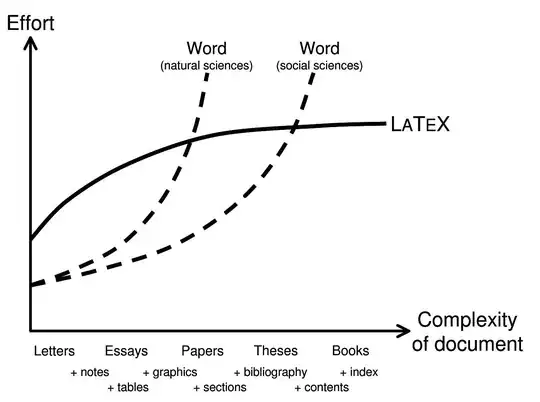
Complexity comparison

enter image description here

Sorantis
  • 2,720
4

I like LaTeX myself. It isn't fancy WYSIWYG stuff, but for me that is more or less an advantage as it lets you focus on the content instead of the design. It is also a lot easier to create consistent documents using LatTeX than by using some kind of traditional word processor.

Anto
  • 11,197
3

LaTex is most suitable for writing technical documents. It is a high-quality typesetting system; it includes features specifically designed for the production of technical and scientific documentation.

You will find everything related setting up LaTeX and using it on the homepage. Also, you will easily find a lot of tutorials on using LaTeX online.

Keval
  • 31
2

Asciidoc (especially the Asciidoctor implementation) is a very attractive option if you would like the robustness of DocBook, while wanting to avoid XML and other markup languages.

2

LaTeX can be good, you might also want to check out DocBook. I am working on a book right now and its being done in DocBook and I quite like it for technical documentation.

Zachary K
  • 10,413
2

LaTeX is definitely a great tool and worth looking into for anyone writing a book or manual.

That being said, I would like to throw a hook out for Sphinx.

Originally designed to create the documentation for Python, Sphinx is language agnostic and pretty flexible. It provides great support for source by using Pygments. The matplotlib team has put together a nice Sphinx example that showcases some of what it can do.

Sphinx uses restructured text as input which is not quite as syntax-heavy as LaTeX as it is similar to the Markdown used to style posts on this site. Sphinx can also generate a wide range of output. Some examples are: HTML Webpages, epub books or even PDF files generated using LaTeX.

On the other hand, by using just LaTeX you have access to a large ecosystem of extension packages that can pull off some pretty impressive feats. The price is that PDF is pretty much your only choice of an output format.

Sharpie
  • 922
1

The most productive combination is a powerful text editor, like Emacs, and an inline markup language like LaTeX. Learning to use Emacs well takes a little time, but nothing else is as efficient over the long run.

kevin cline
  • 33,798
0

I realise this topic has been marked as answered but figured I'd add my $0.02:

I haven't tried the LaTex tools, and personally find Word is a PITA - at least, if someone who thinks they know formatting has had a hand in creating the document.

I'd recommend you give TiddlyWiki a try:

http://www.tiddlywiki.com/

It's super-easy to get started and the markup is really simple to learn thanks to this page:

http://tiddlywiki.org/wiki/TiddlyWiki_Markup