25

I use MS Visio for most of my design/architecting work when I need to be able to save the diagram somewhere and edit it later. I'm not the biggest fan of Visio, but it gets the job done (and it's free at work).

I was wondering if there were any good alternatives to the fairly expensive Visio software, maybe something even better, that you guys have used in the past and were comfortable with. I'd certainly like to have that program in my toolbox!

8 Answers8

27

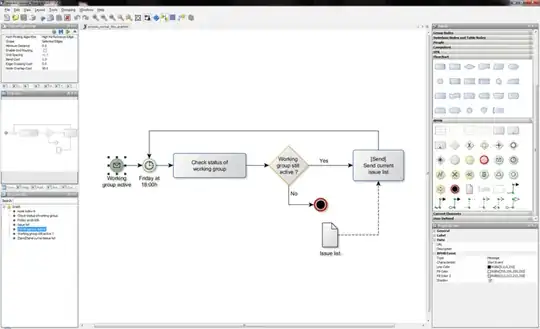
I use yEd. It's freely available for all major platforms and has neat tools for automatic diagram layouts.

a free of charge general-purpose diagramming program with a multi-document interface.

It is a cross-platform application written in Java that runs on Windows, Linux, Mac OS, and other platforms that support the JVM.

yEd can be used to draw many different types of diagrams, including flowcharts, network diagrams, UML diagrams, BPMN diagrams, mind maps, organization charts, and Entity Relationship diagrams. yEd also allows the use of custom vector and raster graphics as diagram elements.

yEd loads and saves diagrams from/to GraphML, an XML-based format. The application can print diagrams including very large diagrams that span multiple pages...

http://upload.wikimedia.org/wikipedia/commons/thumb/3/3f/YEd-screenshot-process_normal_flow-bpmn.png/800px-YEd-screenshot-process_normal_flow-bpmn.png

gnat
  • 20,543
  • 29
  • 115
  • 306
Helbreder
  • 446
3

I use Enterprise Architect (http://www.sparxsystems.com.au/).

Everyone has their own priorities, but to me these are the good ones for a tool such as this:

  • is simple enough to be used out of the box
  • can generate code from class diagrams and vice versa.
  • is able to generate sequence diagrams from a running application. I used it from .NET by attaching a running process and it works just fine.
  • it has a neat model that can be used through a COM interface to automate some of the operations.
  • can store the models in CVS and SVN
  • multiple users can work on the same model at the same time
  • it is not expensive at all
GlenPeterson
  • 14,950
mhttk
  • 159
  • 4
2

UMLet is a free open-source tool for UML diagram design. I have used it occassionally, it's cumbersome to use (or at least was some time ago, maybe they've polished it out since then), but gets the job done. You won't get diagrams as pretty as in Visio, so that might be an issue if they are meant for a more public presentation.

There's also astah*, the community edition is free. I didn't use it though.

scrwtp
  • 4,542
2

I use inkscape. OpenClipart has a fairly wide selection of copyleft technical SVGs for use in technical diagrams, and I keep a folder full of additional symbols that I've created. It's certainly not as feature-rich as visio, but I find that generally when I need to make diagrams I just want something simple that gets the point across anyway, and inkscape does that without getting in my way.

Cercerilla
  • 1,969
1

ModelMaker, my favorite feature is code / model integration, you can generate code from model and vice versa.

btw. I probably should mention that code / model integration works only with C# and Delphi

0

I used CADE a couple of times. I found it much more intuitive than Visio but ran into a couple of problems, so it depends on your needs.

  • It didn't save to any usable format, so I had to use CutePDF to print it into a PDF file to distribute the diagram
  • It fell apart when I remoted into my desktop with a different resolution
  • If you've moved a group of objects from one place to another, it can sometimes be very difficult to change one object in that group without messing up your layout (not so bad if it's one group but I had 7 copies of the same group)
pdr
  • 53,768
0

My favourite swiss army knife for all diagrams is Microsoft Visio 2007 or 2010. Most of my architectural diagrams are not at code level and doesn't strictly follow UML. The diagrams are at conceptual level or component / system integration type. I use simple shapes like squares, rectangles, ellipses, screen shots, various symbols and icons. Visio has tons of them and you can download free shapes from 3rd party for UML, SOA etc. Another advantage is hardware vendors like Dell, Sun,Cisco etc has all there gear in Visio templates.

That said I do use Sparx Enterprise Architect for more code level diagrams using UML. I have also used the architectural diagrams in Visual Studio 2010 Ultimate and they have a niche as well.

softveda
  • 2,679
0

I've tried Argo, Star, Bouml and a couple of others, but my favourites tended towards greater simplicity because they allowed me to sketch ideas quickly without too much fuss:

My fave is this:

http://www.softwareideas.net/

But I also have a soft spot for this:

http://alexdp.free.fr/violetumleditor/page.php

sunwukung
  • 2,275