I have downloaded the most recent version of the Tor bundle 6.5.2 for Mac. When I open the Tor browser I get a message "the proxy server is refusing connections". I have followed the instructions (on YouTube and other sites) to set the Preferences>Advanced>Network>Settings>to Manual Proxy Configuration and select SOCKS Host 127.0.0.1 and Port 9150. I don't really know what a 'proxy' is or how to fix this so that i can use the browser.
Asked
Active
Viewed 1.2e+01k times
9

2 Answers
5
So wierd. I faced this problem in my windows. I figured the issue could be similar with my tor browser aswell. The tor browser application is in a new folder in Desktop. Recently I move everything from my desktop to another new folder in my desktop. Started having this issue. I moved the files back to how it was and then tor started working. Bizarre. Hope this helps if anyone else is facing this issue on a windows.

Nisath
- 51
- 1
- 2
1
I had the same issue and then I realized that I ignored the initial pop-up when starting Tor that suggests to move the downloaded .dmg file to Applications (just as @bradreaves recommends above in his comment).
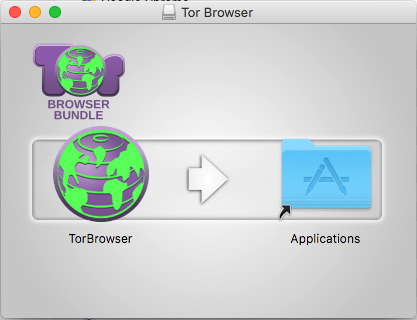
Just a note to myself, because the .dmg file was already in Applications when the above window popped up after double clicking the .dmg:
Click on the Tor Browser icon in the above window
Drag it in the Applications folder

toraritte
- 123
- 7
~/Library/Application Support/TorBrowser-Datafolder then reinstall the app. (this will remove any bookmarks you have saved on Tor Browser, if any) – cacahuatl Jun 01 '17 at 03:43