10

The installation instructions don't cover this. I'm trying to install Tor Bundle for the first time and the setup prompts me for an installation location, defaulted to a folder on my desktop. This doesn't seem right and I don't want to proceed without confirming.
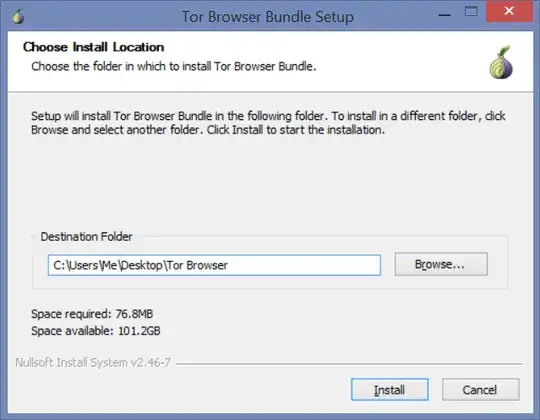
enter image description here

But if I change it to c:\Program Files\Tor Browser or c:\Program Files (x86)\Tor Browser and try to proceed, I get this error:
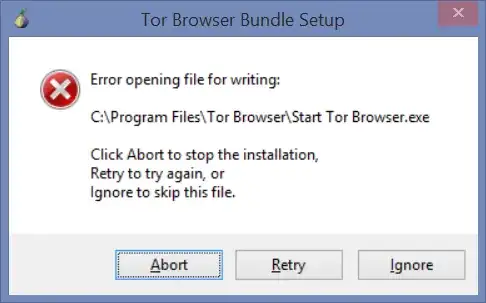
enter image description here

Perhaps this is due to UAC? I'm not prompted. I don't know if running the install As Administrator is the right thing to do either.

Jens Kubieziel
  • 8,630
  • 5
  • 35
  • 116
Jason Kleban
  • 203
  • 1
  • 2
  • 5

1 Answers1

2

One line solution: open the installer with administrative privilege


I guess the term installation is a bit confusing here. Because mainly users think that files are written to some places inside C:, registry is changed etc. The Tor Browser Bundle is so-called portable software. This means the software is installed into a directory as a whole and a relevant files for running the software live inside this directory. Tor Browser Bundle doesn't change registry nor writes it to some system directory. Therefore you can install (or, better, unpack) the software to any directory you want and run it from there. The Tor developers chose Desktop, because it exists on every Windows installation and is easily accessible, I guess. So it is safe to install it there, but you also can choose any other directory which belongs to your username (or if you are an administrator probably to any directory inside your system).

redoc
  • 103
  • 4
Jens Kubieziel
  • 8,630
  • 5
  • 35
  • 116