How can MyISAM be "faster" than InnoDB if
- MyISAM needs to do disk reads for the data?
- InnoDB uses the buffer pool for indexes and data, and MyISAM just for the index?
How can MyISAM be "faster" than InnoDB if


The only way MyISAM can be faster that InnoDB would be under this unique circumstance
When read, a MyISAM table's indexes can be read once from the .MYI file and loaded in the MyISAM Key Cache (as sized by key_buffer_size). How can you make a MyISAM table's .MYD faster to read? With this:
ALTER TABLE mytable ROW_FORMAT=Fixed;
I wrote about this in my past posts
OK, what about InnoDB? Does InnoDB do any disk I/O for queries? Surprisingly, yes it does !! You are probably thinking I am crazy for saying that, but it is absolutely true, even for SELECT queries. At this point, you are probably wondering "How in the world is InnoDB doing disk I/O for queries?"
It all goes back to InnoDB being an ACID-complaint Transactional Storage Engine. In order for InnoDB to be Transactional, it has to support the I in ACID, which is Isolation. The technique for maintaining isolation for transactions is done via MVCC, Multiversion Concurrency Control. In simple terms, InnoDB records what data looks like before transactions attempt to change them. Where does that get recorded? In the system tablespace file, better known as ibdata1. That requires disk I/O.
Since both InnoDB and MyISAM do disk I/O, what random factors dictate who is faster?
DELETEs and UPDATEsThus, in a heavy-read environment, it is possible for a MyISAM table with a Fixed Row Format to outperform InnoDB reads out of the InnoDB Buffer Pool if there is enough data being written into the undo logs contained within ibdata1 to support the transactional behavior imposed on the InnoDB data.
Plan your data types, queries, and storage engine real carefully. Once the data grows, it might become very difficult to move data around. Just ask Facebook...

In a simple world, MyISAM is faster for reads, InnoDB is faster for writes.
Once you start introducing mixed read/writes, InnoDB will be faster for reads as well, thanks to its Row locking mechanism.
I wrote a comparison of MySQL storage engines a few years ago, that still holds true to this day, outlining the unique differences between MyISAM and InnoDB.
In my experience, you should use InnoDB for everything except for read-heavy cache-tables, where losing data due to corruption is not as critical.

To add to the responses here covering the mechanical differences between the two engines, I present an empirical speed comparison study.
In terms of pure speed, it is not always the case that MyISAM is faster than InnoDB but in my experience it tends to be faster for PURE READ working environments by a factor of about 2.0-2.5 times. Clearly this isn't appropriate for all environments - as others have written, MyISAM lacks such things as transactions and foreign keys.
I've done a bit of benchmarking below - I've used python for looping and the timeit library for timing comparisons. For interest I've also included the memory engine, this gives the best performance across the board although it is only suitable for smaller tables (you continually encounter The table 'tbl' is full when you exceed the MySQL memory limit). The four types of select I look at are:
Firstly, I created three tables using the following SQL
CREATE TABLE
    data_interrogation.test_table_myisam
    (
        index_col BIGINT NOT NULL AUTO_INCREMENT,
        value1 DOUBLE,
        value2 DOUBLE,
        value3 DOUBLE,
        value4 DOUBLE,
        PRIMARY KEY (index_col)
    )
    ENGINE=MyISAM DEFAULT CHARSET=utf8
with 'MyISAM' substituted for 'InnoDB' and 'memory' in the second and third tables.
Query: SELECT * FROM tbl WHERE index_col = xx
Result: draw
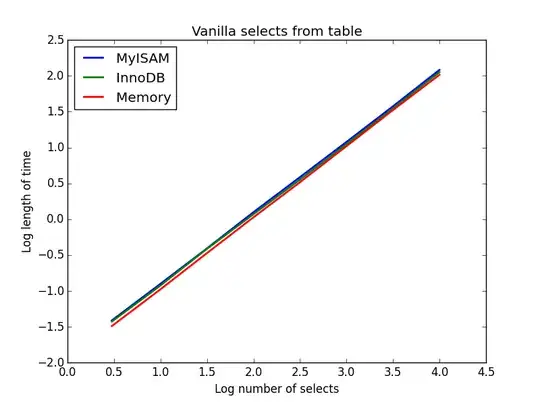
The speed of these is all broadly the same, and as expected is linear in the number of columns to be selected. InnoDB seems slightly faster than MyISAM but this is really marginal.
Code:
import timeit
import MySQLdb
import MySQLdb.cursors
import random
from random import randint
db = MySQLdb.connect(host="...", user="...", passwd="...", db="...", cursorclass=MySQLdb.cursors.DictCursor)
cur = db.cursor()
lengthOfTable = 100000
Fill up the tables with random data
for x in xrange(lengthOfTable):
    rand1 = random.random()
    rand2 = random.random()
    rand3 = random.random()
    rand4 = random.random()
insertString = "INSERT INTO test_table_innodb (value1,value2,value3,value4) VALUES (" + str(rand1) + "," + str(rand2) + "," + str(rand3) + "," + str(rand4) + ")"
insertString2 = "INSERT INTO test_table_myisam (value1,value2,value3,value4) VALUES (" + str(rand1) + "," + str(rand2) + "," + str(rand3) + "," + str(rand4) + ")"
insertString3 = "INSERT INTO test_table_memory (value1,value2,value3,value4) VALUES (" + str(rand1) + "," + str(rand2) + "," + str(rand3) + "," + str(rand4) + ")"

cur.execute(insertString)
cur.execute(insertString2)
cur.execute(insertString3)


db.commit()
Define a function to pull a certain number of records from these tables
def selectRandomRecords(testTable,numberOfRecords):
for x in xrange(numberOfRecords):
    rand1 = randint(0,lengthOfTable)

    selectString = "SELECT * FROM " + testTable + " WHERE index_col = " + str(rand1)
    cur.execute(selectString)


setupString = "from main import selectRandomRecords"
Test time taken using timeit
myisam_times = []
innodb_times = []
memory_times = []
for theLength in [3,10,30,100,300,1000,3000,10000]:
innodb_times.append( timeit.timeit('selectRandomRecords("test_table_innodb",' + str(theLength) + ')', number=100, setup=setupString) )
myisam_times.append( timeit.timeit('selectRandomRecords("test_table_myisam",' + str(theLength) + ')', number=100, setup=setupString) )
memory_times.append( timeit.timeit('selectRandomRecords("test_table_memory",' + str(theLength) + ')', number=100, setup=setupString) )
Query: SELECT count(*) FROM tbl
Result: MyISAM wins
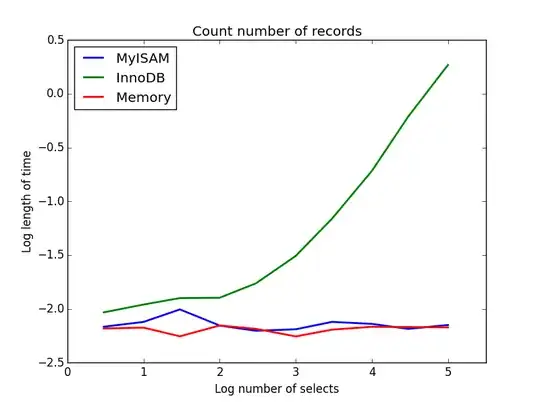
This one demonstrates a big difference between MyISAM and InnoDB - MyISAM (and memory) keeps track of the number of records in the table, so this transaction is fast and O(1). The amount of time required for InnoDB to count increases super-linearly with table size in the range I investigated. I suspect many of the speed-ups from MyISAM queries that are observed in practice are due to similar effects.
Code:
myisam_times = []
innodb_times = []
memory_times = []
Define a function to count the records
def countRecords(testTable):
selectString = "SELECT count(*) FROM " + testTable
cur.execute(selectString)


setupString = "from main import countRecords"
Truncate the tables and re-fill with a set amount of data
for theLength in [3,10,30,100,300,1000,3000,10000,30000,100000]:
truncateString = "TRUNCATE test_table_innodb"
truncateString2 = "TRUNCATE test_table_myisam"
truncateString3 = "TRUNCATE test_table_memory"

cur.execute(truncateString)
cur.execute(truncateString2)
cur.execute(truncateString3)

for x in xrange(theLength):
    rand1 = random.random()
    rand2 = random.random()
    rand3 = random.random()
    rand4 = random.random()

    insertString = "INSERT INTO test_table_innodb (value1,value2,value3,value4) VALUES (" + str(rand1) + "," + str(rand2) + "," + str(rand3) + "," + str(rand4) + ")"
    insertString2 = "INSERT INTO test_table_myisam (value1,value2,value3,value4) VALUES (" + str(rand1) + "," + str(rand2) + "," + str(rand3) + "," + str(rand4) + ")"
    insertString3 = "INSERT INTO test_table_memory (value1,value2,value3,value4) VALUES (" + str(rand1) + "," + str(rand2) + "," + str(rand3) + "," + str(rand4) + ")"

    cur.execute(insertString)
    cur.execute(insertString2)
    cur.execute(insertString3)

db.commit()

# Count and time the query
innodb_times.append( timeit.timeit('countRecords("test_table_innodb")', number=100, setup=setupString) )
myisam_times.append( timeit.timeit('countRecords("test_table_myisam")', number=100, setup=setupString) )
memory_times.append( timeit.timeit('countRecords("test_table_memory")', number=100, setup=setupString) )
Query: SELECT * FROM tbl WHERE value1<0.5 AND value2<0.5 AND value3<0.5 AND value4<0.5
Result: MyISAM wins
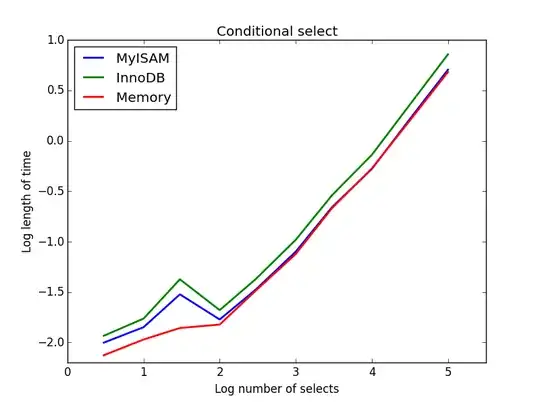
Here, MyISAM and memory perform approximately the same, and beat InnoDB by about 50% for larger tables. This is the sort of query for which the benefits of MyISAM seem to be maximised.
Code:
myisam_times = []
innodb_times = []
memory_times = []
Define a function to perform conditional selects
def conditionalSelect(testTable):
selectString = "SELECT * FROM " + testTable + " WHERE value1 < 0.5 AND value2 < 0.5 AND value3 < 0.5 AND value4 < 0.5"
cur.execute(selectString)
setupString = "from main import conditionalSelect"
Truncate the tables and re-fill with a set amount of data
for theLength in [3,10,30,100,300,1000,3000,10000,30000,100000]:
truncateString = "TRUNCATE test_table_innodb"
truncateString2 = "TRUNCATE test_table_myisam"
truncateString3 = "TRUNCATE test_table_memory"
cur.execute(truncateString)
cur.execute(truncateString2)
cur.execute(truncateString3)
for x in xrange(theLength):
rand1 = random.random()
rand2 = random.random()
rand3 = random.random()
rand4 = random.random()
insertString = "INSERT INTO test_table_innodb (value1,value2,value3,value4) VALUES (" + str(rand1) + "," + str(rand2) + "," + str(rand3) + "," + str(rand4) + ")"
insertString2 = "INSERT INTO test_table_myisam (value1,value2,value3,value4) VALUES (" + str(rand1) + "," + str(rand2) + "," + str(rand3) + "," + str(rand4) + ")"
insertString3 = "INSERT INTO test_table_memory (value1,value2,value3,value4) VALUES (" + str(rand1) + "," + str(rand2) + "," + str(rand3) + "," + str(rand4) + ")"
cur.execute(insertString)
cur.execute(insertString2)
cur.execute(insertString3)
db.commit()
# Count and time the query
innodb_times.append( timeit.timeit('conditionalSelect("test_table_innodb")', number=100, setup=setupString) )
myisam_times.append( timeit.timeit('conditionalSelect("test_table_myisam")', number=100, setup=setupString) )
memory_times.append( timeit.timeit('conditionalSelect("test_table_memory")', number=100, setup=setupString) )
Result: InnoDB wins
For this query, I created an additional set of tables for the sub-select. Each is simply two columns of BIGINTs, one with a primary key index and one without any index. Due to the large table size, I didn't test the memory engine. The SQL table creation command was
CREATE TABLE
    subselect_myisam
    (
        index_col bigint NOT NULL,
        non_index_col bigint,
        PRIMARY KEY (index_col)
    )
    ENGINE=MyISAM DEFAULT CHARSET=utf8;
where once again, 'MyISAM' is substituted for 'InnoDB' in the second table.
In this query, I leave the size of the selection table at 1000000 and instead vary the size of the sub-selected columns.
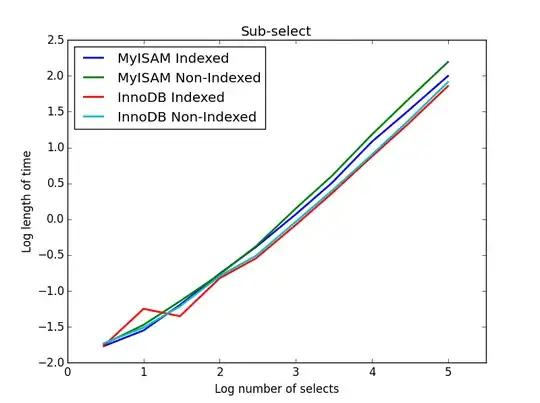
Here the InnoDB wins easily. After we get to a reasonable size table both engines scale linearly with the size of the sub-select. The index speeds up the MyISAM command but interestingly has little effect on the InnoDB speed. subSelect.png
Code:
myisam_times = []
innodb_times = []
myisam_times_2 = []
innodb_times_2 = []
def subSelectRecordsIndexed(testTable,testSubSelect):
    selectString = "SELECT * FROM " + testTable + " WHERE index_col in ( SELECT index_col FROM " + testSubSelect + " )"
    cur.execute(selectString)
setupString = "from main import subSelectRecordsIndexed"
def subSelectRecordsNotIndexed(testTable,testSubSelect):
    selectString = "SELECT * FROM " + testTable + " WHERE index_col in ( SELECT non_index_col FROM " + testSubSelect + " )"
    cur.execute(selectString)
setupString2 = "from main import subSelectRecordsNotIndexed"
Truncate the old tables, and re-fill with 1000000 records
truncateString = "TRUNCATE test_table_innodb"
truncateString2 = "TRUNCATE test_table_myisam"
cur.execute(truncateString)
cur.execute(truncateString2)
lengthOfTable = 1000000
Fill up the tables with random data
for x in xrange(lengthOfTable):
    rand1 = random.random()
    rand2 = random.random()
    rand3 = random.random()
    rand4 = random.random()
insertString = "INSERT INTO test_table_innodb (value1,value2,value3,value4) VALUES (" + str(rand1) + "," + str(rand2) + "," + str(rand3) + "," + str(rand4) + ")"
insertString2 = "INSERT INTO test_table_myisam (value1,value2,value3,value4) VALUES (" + str(rand1) + "," + str(rand2) + "," + str(rand3) + "," + str(rand4) + ")"

cur.execute(insertString)
cur.execute(insertString2)


for theLength in [3,10,30,100,300,1000,3000,10000,30000,100000]:
truncateString = "TRUNCATE subselect_innodb"
truncateString2 = "TRUNCATE subselect_myisam"

cur.execute(truncateString)
cur.execute(truncateString2)

# For each length, empty the table and re-fill it with random data
rand_sample = sorted(random.sample(xrange(lengthOfTable), theLength))
rand_sample_2 = random.sample(xrange(lengthOfTable), theLength)

for (the_value_1,the_value_2) in zip(rand_sample,rand_sample_2):
    insertString = "INSERT INTO subselect_innodb (index_col,non_index_col) VALUES (" + str(the_value_1) + "," + str(the_value_2) + ")"
    insertString2 = "INSERT INTO subselect_myisam (index_col,non_index_col) VALUES (" + str(the_value_1) + "," + str(the_value_2) + ")"

    cur.execute(insertString)
    cur.execute(insertString2)

db.commit()

# Finally, time the queries
innodb_times.append( timeit.timeit('subSelectRecordsIndexed("test_table_innodb","subselect_innodb")', number=100, setup=setupString) )
myisam_times.append( timeit.timeit('subSelectRecordsIndexed("test_table_myisam","subselect_myisam")', number=100, setup=setupString) )

innodb_times_2.append( timeit.timeit('subSelectRecordsNotIndexed("test_table_innodb","subselect_innodb")', number=100, setup=setupString2) )
myisam_times_2.append( timeit.timeit('subSelectRecordsNotIndexed("test_table_myisam","subselect_myisam")', number=100, setup=setupString2) )
I think the take-home message of all of this is that if you are really concerned about speed, you need to benchmark the queries that you're doing rather than make any assumptions about which engine will be more suitable.
Which is faster? Either might be faster. YMMV.
Which should you use? InnoDB -- crash-safe, etc, etc.


