33

I am trying to make the following SQL statement work, but I get a syntax error:

SELECT A.*, COUNT(B.foo)
FROM TABLE1 A
LEFT JOIN TABLE2 B ON A.PKey = B.FKey
GROUP BY A.*

Here, A is a wide table with 40 columns and I would like to avoid listing each column name in the GROUP BY clause if possible. I have many such tables over which I have to run a similar query, so I will have to write a Stored Procedure. What's the best way to approach this?

I am using MS SQL Server 2008.

Jon Seigel
  • 16,922
  • 6
  • 45
  • 85
Anonymous Maximus
  • 779
  • 2
  • 8
  • 16

3 Answers3

35

GROUP BY A.* is not allowed in SQL.

You can bypass this by using a subquery where you group by, and then join:

SELECT A.*, COALESCE(B.cnt, 0) AS Count_B_Foo
FROM TABLE1 AS A
  LEFT JOIN 
      ( SELECT FKey, COUNT(foo) AS cnt
        FROM TABLE2 
        GROUP BY FKey
      ) AS B 
    ON A.PKey = B.FKey ;

There is a feature in SQL-2003 standard to allow in the SELECT list, columns that are not in the GROUP BY list, as long as they are functionally dependent on them. If that feature had been implemented in SQL-Server, your query could have been written as:

SELECT A.*, COUNT(B.foo)
FROM TABLE1 A
LEFT JOIN TABLE2 B ON A.PKey = B.FKey
GROUP BY A.pk                          --- the Primary Key of table A

Unfortunately, this feature has not yet been implemented, not even in SQL-Server 2012 version - and not in any other DBMS as far as I know. Except for MySQL which has it but inadequately (inadequately as: the above query will work but the engine will do no checking for functional dependency and other ill-written queries will show wrong, semi-random results).

As @Mark Byers informed us in a comment, PostgreSQL 9.1 added a new feature designed for this purpose. It is more restrictive than MySQL's implementation.

ypercubeᵀᴹ
  • 99,450
  • 13
  • 217
  • 306
25

In addition to @ypercube's workaround, "typing" is never an excuse for using SELECT *. I've written about this here, and even with the workaround I think your SELECT list should still include the column names - even if there are a massive number like 40.

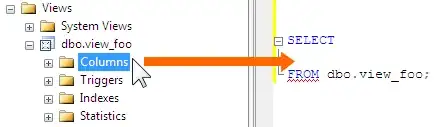
Long story short, you can avoid typing these big lists by clicking and dragging the Columns node for the object in Object Explorer onto your query window. The screen shot shows a view but the same thing can be done for a table.

enter image description here

But if you want to read about all the reasons why you should subject yourself to this huge level of effort of dragging an item a few inches, please read my post. :-)

Aaron Bertrand
  • 181,950
  • 28
  • 405
  • 624
0

This may be better addressed with an outer apply. (thus eliminating the need for the group by *)

If you are confident of an 1:n cardinality:

SELECT A.*, B.CountFoo
FROM TABLE1 A
outer apply (select count(B.Foo) as CountFoo from TABLE2 B where A.PKey = B.FKey) B

If Table1 has duplicates on PKey (though depending on your use, you start to have a wash in terms of complexity vs just doing the group by):

;with DupRows as 
(
    SELECT A.*
        ,MultipledCountFoo = B.CountFoo * Count(*) over (partition by A.PKey)
        ,RN = ROW_NUMBER() over (partition by A.PKey order by A.PKey)
    FROM TABLE1 A
    outer apply (select count(B.Foo) as CountFoo from TABLE2 B where A.PKey = B.FKey group by A.) B
)
Select * from DupRows where RN=1

Avoiding "Select * "

It is important to note there are cases with CTEs where the physical column selection is done previously/later and the "all columns" selection becomes useful/practical and does not affect the execution plan. Yes, you need to EVENTUALLY limit your column selection and that needs to happen prior to any materialization (ie union all), but there are acceptable uses of select *.

Version Support

FYI, it looks like this is supported on sql server 2008 (r2?) but it's getting harder and harder to search for the documentation prior to 2016. Also hard for me to say how outer apply performed on 2008. I can confirm it is black-magic-awesome in the later versions compared to equivalent nested queries.

b_levitt
  • 117
  • 3