The WmiPrvSE.exe belongs to the service Windows Management Instrumentation and is located in the %WINDIR%\SysWOW64\wbem directory.
However, when looking at the Task Manager compared to the details of the Windows Management Instrumentation service, you may notice that the service runs via the C:\WINDOWS\system32\svchost.exe -k netsvcs -p process/executable.
So you will have a WmiPrvSE.exe running in the Task Manager, but the service is running via said svchost.exe process. What is the reason for this?
Explaining (Some) Windows Services
You can determine what is actually running as a service by starting the Sysinternals tool procexp.exe and looking at the details of the individual svchost.exe processes running by mousing over the various svchost.exe processes running.
It looks a bit like this:

You can then click on the details of that process and will find the following:
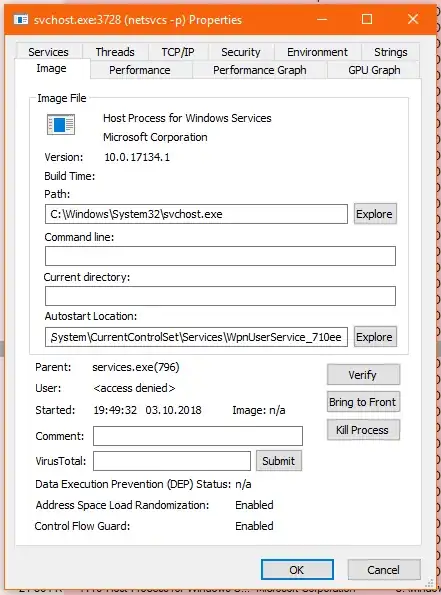
And if you switch to the Service tab you will find this:
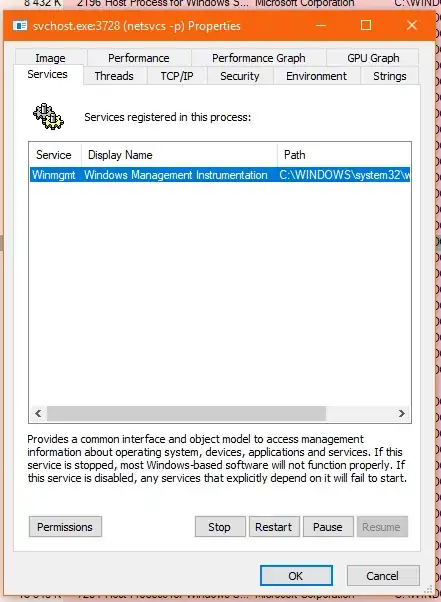
...scroll a bit to the right and you are presented with:
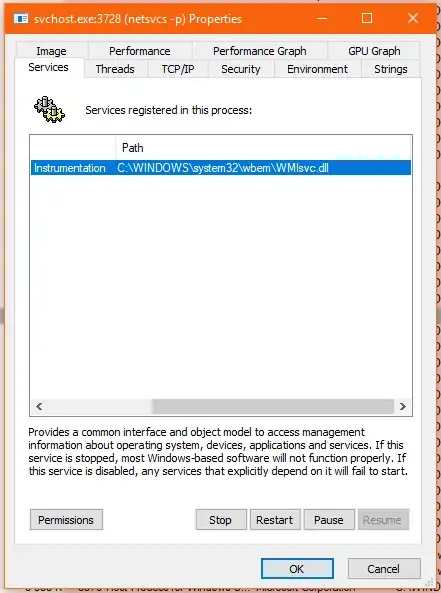
What's Going On?
When various windows services start (and you might have noticed there are a few), they don't always start the actual <service_name>.exe, but instead a kind of shell executable, which is the svchost.exe and a corresponding *.DLL required by the service.
If the system or user actually requires a portion of that service, either by starting a program or opening up an Management Console, then the *.DLL which has been loaded by the svchost.exe process will trigger the actual executable required.
In fact during the writing of this answer the WmiPrvSE.exe started multiple times and then closed again, even though the service was always in the running state.
Answering Your Question
Is it safe to stop all the instances of this application in order to go on with the updates?
Option 1
You can safely stop the Windows Management Instrumentation service and continue with your SQL Server upgrade/installation.
However, when you stop the Windows Management Instrumentation service, you might be prompted to close other services that rely on WMI to be in a running state. Examples from my computer:
- VMware USB Arbitration Service
- IP Helper
- ...
This can reduce the probability of having to reboot after upgrading. It will not stop the installation routing from rebooting the SQL Server service (if required).
Option 2
In some cases you can wait a bit for the WmiPrvSE.exe to shut itself down and then continue with the installation. But, depending on what your server is running, this could take a while.
Option 3
Let the installation continue and reboot the server. Your SQL Server service might go down anyway.


