91

We recently had a little problem with networking where multiple servers would intermittently lose network connectivity in a fairly painful-to-resolve way (required hard reboot). This has been going on for about two weeks, seemingly at random, on different servers. No particular pattern that we could discern to it.

After some digging into it, we saw that the switch was reporting 100 Mbps for the problem port:
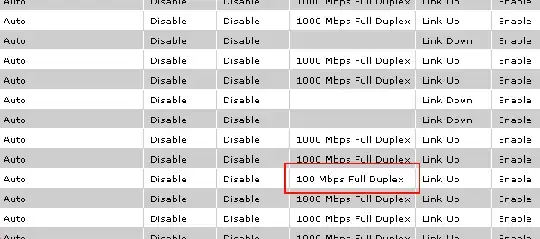
This sounds remarkably like what happened in the Joel Spolsky article Five Whys

Michael spent some time doing a post-mortem, and discovered that the problem was a simple configuration problem on the switch. There are several possible speeds that a switch can use to communicate (10, 100, or 1000 megabits/second). You can either set the speed manually, or you can let the switch automatically negotiate the highest speed that both sides can work with. The switch that failed had been set to autonegotiate. This usually works, but not always, and on the morning of January 10th, it didn’t.

We have now disabled auto-negotiate on our network hardware and set it to a fixed rate of 1000 Mbps (gigabit).

My questions to those with more server hardware networking expertise:

  1. How common are auto-negotiate problems with modern networking hardware?
  2. Is it considered good, standard networking practice to disable auto-negotiate and set fixed speeds when setting up networking?
Jeff Atwood
  • 13,264

17 Answers17

102
  1. I have yet to see a problem with auto-negotiation of network speeds that isn't caused by either (a) a mismatch of manual on one end of the link and auto on the other or (b) a failing component of the link (cable, port, etc).

  2. This depends on the admin, but my experience has shown me that if you manually specify the link speeds and duplex settings, than you are bound to run into speed mismatches. Why? Because it is nearly impossible to document the various connections between switches and servers and then follow that documentation when making changes. Most failures I have seen are because of 1(a) and you only get in to that situation when you start manually setting speed/duplex settings.

As mention in the Cisco documentation:

If you disable autonegotiation, it hides link drops and other physical layer problems. Only disable autonegotiation to end-devices, such as older Gigabit NICs that do not support Gigabit autonegotiation. Do not disable autonegotiation between switches unless absolutely required, as physical layer problems can go undetected and result in spanning tree loops.

Unless you are prepared to setup a change management system for network changes that requires the verification of speed/duplex (and don't forget flow control) or are willing to deal with occasional mismatches that come from manually specifying these settings on all network devices, then stick with the default configuration of auto/auto.

In the future, consider monitoring the errors on the switch ports with MRTG so you can spot these issues before you have a problem.

Edit: I do see a lot of people referencing negotiation failures on old equipment. Yes this was an issue a long time ago when the standards were being created and not all devices followed them. Are your NICs and switches less than 10 years old? If so, then this won't be an issue.

Doug Luxem
  • 9,652
23
  1. Very common, I've had numerous problems over the years with various types of hardware.

  2. In my opinion if the setup is static(i.e. a server rack) and you don't think there will be changes it is a good idea to setup the speeds and duplexs manually. As long as it is well documented so that future problems can be averted.

EDIT:

Just to clarify, I am not advocating using manual speeds on your entire network, I would say that 95% of the time auto/auto is the way to go. I'm just saying I've had problems with duplex/speed and there are small portions of my network (i.e. one of our server racks ) that have mostly manual settings. We operate a very tightly controlled LAN with unused ports being shutdown and MAC-Filters on most of the ports so keeping track of the speeds is not very difficult.

einstiien
  • 2,608
15

I believe if autonegotiation was working for an hour a day or a month and then for some reason "something happens" that setting the link to fixed speed "fixes it" there is a problem that's not being solved but circumvented instead. I guess I see setting the link to fixed as a temporary solution until the real problem gets corrected.

dimitri.p
  • 657
15

So the troubleshooting steps (assume you stop after each and wait for the issue to reappear):

  1. Check the logs on the switch to see if it tells you why it's using 100M.
  2. If you're still running it, turn off that extremely evil "Windows load balancing" bullshit that Joel is pushing all the time -- the way it works is by breaking the switch's cache, forcing it to software process every packet. Your switch is designed to forward packets in hardware, and has only the CPU required to figure out what physical path an unknown traffic flow has to take (in -> asic -> out), and program the hardware to do it (read: a calculator has a better CPU than your switch, don't do stupid things that make your switch's CPU work harder). Windows load balancing works by making your switch make that decision and reinstall the hardware cache for every packet. That may not fix this particular problem, but it bugs me from the podcasts... sorry.
  3. Make sure the config matches on both sides -- sounds like you've done that
  4. Google for autoneg bugs on your switch -- unless you built it yourself, you're not the only one trying to run autoneg on whatever it is you're using
  5. Replace the cable, with rated Cat5e or better -- ideally a cable you know works, like the one your workstation is plugged into. Don't try to use Cat5, or some crap somebody made, use one that has actual molded ends out of a package.
  6. Move the port -- Put the server on a different port on the same switch
  7. Change out the NIC -- use a different batch ordered at a different time

At this point, you've eliminated the configuration, the physical ports you're plugged into, the cabling between them. If it's still happening, some other causes may be:

  1. Cable routing -- be careful of EM interference from your AC power cables, route them down different sides of the rack.
  2. Cooling -- Make sure you're environmental temp isn't something like 90 degrees and your NIC cards aren't dropping into some kind of "dear god let me just forward this one packet please" mode. I've heard but not seen that Cisco routers stop doing fast-switching and forward packets via CPU when they're overheating, for example.
  3. Replace the switch with something that doesn't suck -- check how much bandwidth your hosts are talking per second in aggregate, and then look at the rated backplane capacitiy of your switch. 7 hosts out of the potential 48 all transmitting 1.0G is enough to stop a Cisco 3750, for example. Also be very careful about the cheapo also-ran network vendors: D-Link, Linksys, Dell, Intel, and HP. Nobody treating networking seriously uses those guys, and not because "nobody was ever fired for using Cisco", but because "people remember that Intel switch that had 20/48 ports fail over 2 years" or the "I used to use ProCurve exclusively and rail about how evil Cisco was, until I actually used Cisco, at which point I stopped buying anything less". Cisco is considered a mid-range network vendor, so what does that tell you about the guys below Cisco...? :-)

Background/why my answer is the most awesome: I work as a network/systems engineer in the financial industry, and here's my experience with our small-ish global network (15 branch offices, 8 datacenters):

All our LAN ports are autoneg, because we control the equipment on both ends, and have some kind of access to both sides---which may be as simple as getting on the phone to someone and having them check settings. In three years, I've only ever had one of our internal ports fail due to autoneg failing, and that was because of a bad cable---it went away after replacing the cable.

We had way more problems where predecessors had hardcoded 100/full on their NICs, and didn't document that fact. Reset everything to auto/auto at the next maint window and haven't had any issues with them since.

On the couple places where we've got copper handoff from a carrier for our WAN? You should pretty much expect a copper WAN/Internet connection to suck, all the time---in part because you've got no idea what's on the other side. Some ancient Extreme switch that happens to have buggy firmware for autoneg but does MPLS tagging? Some $5 media converter because your ISP's $200k Ciena edge device is simply too awesome to provide Ethernet over twisted pair? Decide in advance how that's going to be handled and stick to it, then expect some twit inside the carrier to change it at 10pm on a Saturday because the agreed-upon config was never documented and they have some policy to follow.

Seriously, though, get a fiber handoff from your ISP.

James Cape
  • 1,077
14

The network that I'm responsible for (along with a few other guys) is made up of ~40 servers, 1000+ workstations (spread across a rather large campus) and ~1000 WAPs also spread across a large area with varying types and ages of network equipment.

As dimitri.p said, when something suddenly fails to stop autonegotiating, it's usually an indication of another problem. Setting the port manually is akin to putting a bandaid on someone who got stabbed in the gut - it might stop the bleeding, but there's sure to be damage underneath.

My usual checklist:

  • did anything change on the machine? drivers? OS- or BIOS-level settings? Perhaps autoneg was disabled in the OS?
  • have you swapped out the patch cables, and verified the cable runs (if it's a logner run than one rack?)
  • have you tested to see if the switch port is bad or failing?
  • could the NIC be going bad?

We, as a rule, never disable autoneg on servers (or anything else in the data center) unless it's a situation where all other possible causes have been eliminated, we moved switch ports, changed cables, tested the NIC, etc. and there's no other choice. In which case, it gets documented to death. This happens very rarely, and usually with appliances that we can't get access to check BIOS and OS settings.

The workstations and APs, on the other hand, are a different story. Failed autoneg is a classic sign of a bad cable run, and many times we have to manually set speed and duplex until the summer running-new-cables-in-the-walls season comes around.

Jason Antman
  • 1,536
12

You should auto-negotiate. If you've got a switch that won't auto-negotiate reliably, buy a better switch.

Gigabit is supposed to auto-negotiate, and that includes auto-crossover (MDI-X) detection.

100baseT is guaranteed to fail if one end is set to auto and the other set to manual, and that's per the specifications. If you force one end to 100/full then the other end will auto-negotiate to 100/half, giving you a duplex mismatch.

Alnitak
  • 21,641
10

This is network myth. Our network guys swear by this nonsense, because back in 1998 Bay switches would not negotiate with Cisco or something. So instead of using the default for 99.999% of the equipment on earth, we have this ridiculous configuration management exercise and a great scapegoat for those times where a NIC driver update resets the settings to auto-negotiate and anything happens.

Its made more amusing because many of our servers use dubious features like NIC teaming, which prevent you from losing network access in the unlikely event of a switch failure, while exposing you to the far more likely software failure. (The drivers always suck)

In defense of the network guys, plenty of severs are running with Windows-default NIC drivers, which typically suck. If you have problems with autonegotiate, and your gear doesn't date to the Clinton administration, update those NIC drivers.

duffbeer703
  • 22,305
8

Typically I set servers to be fixed as I've seen network equipment negotiate to 10/half instead of 1000/full.

Also some CoLos set their switches not to negotiate, but to only make link at 1000/full.

mrdenny
  • 27,212
7

Disabling auto-negotiation in an untested initial configuration is akin to voodoo programming -- you're changing something without good reason. If, after you've tested, you see there is a duplex or speed mismatch or there are excessive errors on the port, then engage in other troubleshooting and finally fix the config if necessary.

When you upgrade a driver or replace hardware, there are no guarantees that your settings will be retained on the server side.

Set both sides of the link to negotiate, or fix both sides. When you fix the speed and duplex settings on some devices, they no longer announce their capabilities to their peers. I don't know what the Ethernet standard says about what to do when one side announces capabilities and the other side doesn't, and that probably means a lot of implementers don't know either. Some will pick lowest common denominator, which is 10-half and others will assume everything is okay and pick the fastest speed possible.

There are some contemporary pieces of hardware that don't support auto-negotiation on gigabit copper Ethernet, like (at least some) Cisco switches with copper SFP's.

jaredg
  • 221
6

Many years ago I spent some time working for 3com doing tech support for pretty much all of their networking gear. It is amazing how often this issue came up and it was pretty much standard procedure to set everything manually.

4

Rough one. I've seen 100Mb 3com NICs that wouldn't connect at anything above 10Mb if you forced the speed or duplex. You could only get full speed by letting them auto negotiate even though the driver had 100Mb Full and 100Mb Half settings.

Many NIC drivers won't let you specify 1000Mb. The only choices are 10, 100, Auto. Again forcing you to do Auto if you want full speed. for example the Broadcom netXtreme 57xx Gigabit driver behaves this way.

You can easily force Gigabit on the switch but I think you'll be forced to let most NICs auto negotiate.

pplrppl
  • 1,262
3
  1. In my experience (mostly 3Com and HP equipment, not much Cisco), auto-negotiate doesn't cause a lot of problems.

  2. Similarly to mrdenny, I'll usually set servers to their fastest speed (we've still got some at 100), full duplex, and then leave the switch on auto. Since we have a mixture of speeds on both servers and workstations, I much much prefer to leave the switches on auto and let them adapt to the endpoint.

Ward
  • 13,010
3

I have had many problems with auto negotiation. Many, of course, means one every few months, but that's one problem too many in my book.

Auto negotiation problems are hard to find, particularly when the people handling network, servers, applications and databases are four different teams. Usually, the last two will spend lots of time going back and forth, accusing each other of bad performance and lying about measurements, and sometimes kick it to the server people, who will duly look at the output of "top" and say everything is fine with the server.

This goes on until the matter escalates to the point where an "expert" (actually, someone who is a generalist, and thus understands networks, hardware, operating systems, databases, frameworks and applications) is assigned to the trouble, and finds the problem within five or ten minutes.

So, my own rule of thumb, whenever I have the ability to do something about it, is to ALWAYS set fixed speeds on production servers, switchers and routers. Non-production servers as well, if they are segregated enough for the people who use it not have root access in it.

Switches handling desktop/notebook access can be left to auto-negotiate, and there are exceptions to the rule. Just to mention one, if there's a lot of changes going on in the network, it's better to leave it on auto and keep an eye on things.

Another point that may be useful, whatever choice you make regarding auto-negotiation, is to monitor the thing. Just configure Nagios or what-have-you to keep an eye on the state of any important port. You are already monitoring that network equipment anyway, aren't you?

3

I've had some problems with autonegotiation in a home setup and the problem was wiring, in particular the network cables rolled up in a loop with a too small diameter or putting it too close to power cables.

But I figure those suggestions are a bit too trivial for your setup. ;)

macbirdie
  • 581
2

I was recently reading about this in Network Warrior by Gary Donahue. Based on the this book for auto-negotiation to work correctly BOTH the switch and the NIC must be set to auto-negotiation. Setting the NIC to a specific speed and duplex mode and leaving the server on auto-negotiation will not work correctly - auto-negotiation is a protocol and both sides need to be speaking it for settings to work correctly.

If you want to explicitly set speed and duplex mode you need to do it on both ends of the connection.

Bob Weber
  • 121
2

Cisco discuss some cases where you might want to manually configure port speed and duplex rather than using autonegotiate, when using PIX/ASA security devices: http://www.cisco.com/en/US/products/hw/vpndevc/ps2030/products_tech_note09186a008009491c.shtml#troubleshoot

dunxd
  • 9,874
1

My rule of thumb is to use auto negotiate for everything except router links unless you specifically have a problem (like recent Broadcom cards... BAH!)

If you have two routers linked via ethernet for example, manually set the speed on both ends.