78

How do you grant access to network resources to the LocalSystem (NT AUTHORITY\SYSTEM) account?


Background

When accessing the network, the LocalSystem account acts as the computer on the network:

LocalSystem Account

The LocalSystem account is a predefined local account used by the service control manager.

...and acts as the computer on the network.

Or to say the same thing again: The LocalSystem account acts as the computer on the network:

When a service runs under the LocalSystem account on a computer that is a domain member, the service has whatever network access is granted to the computer account, or to any groups of which the computer account is a member.

How does one grant a "computer" access to a shared folder and files?


Note:

Computer accounts typically have few privileges and do not belong to groups.

So how would i grant a computer access to one of my shares; considering that "Everyone" already has access?

Note: workgroup

| Account        | Presents credentials |
|----------------|----------------------|
| LocalSystem    | Machine$             |
| LocalService   | Anonymous            |
| NetworkService | Machine$             |
Ian Boyd
  • 5,453

4 Answers4

70

In a domain environment, you can grant access rights to computer accounts; this applies to processes running on those computers as LocalSystem or NetworkService (but not LocalService, which presents anonymous credentials on the network) when they connect to remote systems.

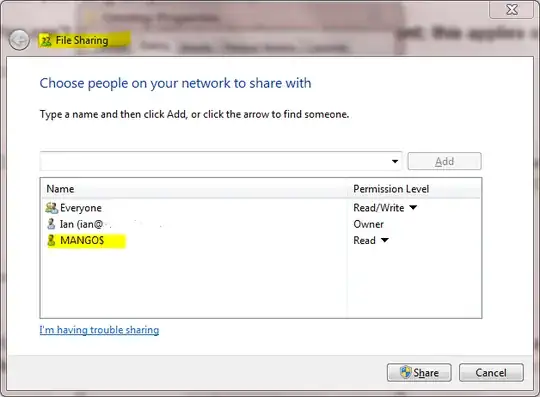
So, if you have a computer called MANGO, that machine will have a computer account in Active Directory called MANGO$, which you can grant permissions to.

enter image description here

Note: You can't do any of this in a workgroup environment; this applies only to domains.

Massimo
  • 72,827
5

It's useful to note that computer accounts also fall under Authenticated Users. So you don't have to grant individual computerName$ accounts on your network resource, you can cover all your computers by granting rights to Authenticated Users, if that's your desired scenario.

You can also use YourDomain\Domain Computers

Sandra
  • 281
3

You don't. If you need a service to connect to remote files or other network services, then you want to have the service run as a named account, and on the remote machine, assign rights to that named account.

It would really be best if you full explain what you're trying to do - that way you'll get the best answers.

mfinni
  • 36,892
-1

It is Simple:

Put the Machine“s AD Account into the local Admins Group and then this Machine (or its Local Admin Account) can fully Access the destination OVER the Network. Tested today, works fine.

womble
  • 98,245