How do i configure a scheduled task to run as NT AUTHORITY\NetworkService in Windows Server 2003?
Background
Even though the account is known as NetworkService, the full name is NT AUTHORITY\Network Service.
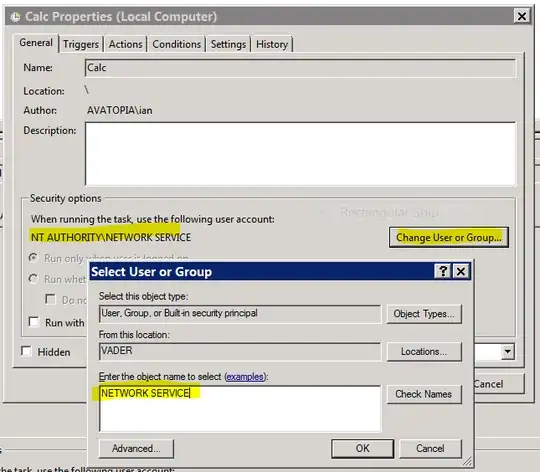
On Windows Server 2008 R2, when choosing the account to run the task as, you must specify:
NETWORK SERVICE(with a space)
That will then resolve to NT AUTHORITY\NetworkService (no space):
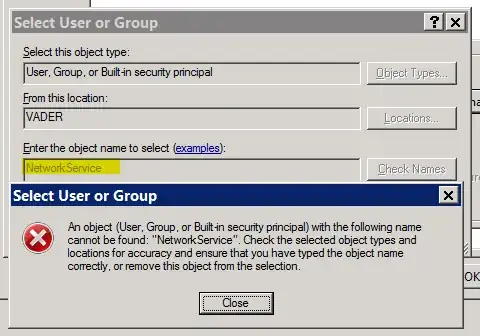
Note: You cannot try to specify NetworkService
Nor can you specify NT AUTHORITY\NetworkService.
In summary:
NETWORK SERVICEvalidNetworkServiceinvalidNT AUTHORITY\NetworkServiceinvalid
The same is true on Windows 7. You must specify NETWORK SERVICE if you wish for a scheduled task to run as NetworkService (aka NT AUTHORITY\NetworkService)
What about Windows Server 2003?
In Windows Server 2003 it doesn't work:

i know that any password given for the Network Service (or Local Service) accounts are ignored, as the accounts have no password:
Note that this account does not have a password, so any password information that you provide in this call is ignored.
But i cannot specify that account:

NETWORK SERVICEinvalidNetworkServiceinvalidNT AUTHORITY\NetworkServiceinvalid
NetworkService security
The NetworkService account, like LocalService, are limited rights accounts. The only difference between them is that:
- NetworkService presents machine credentials (e.g. VADER$) when accessing the network
- LocalService presents anonymous credentials when accessing the network
My question works just as well if i want to have a scheduled task run as LocalService (aka NT AUTHORITY\LocalService). i just happened to choose NetworkService when asking this question.
See the question:
How do i configure a scheduled task to run as NT AUTHORITY\Network Service in Windows Server 2003?

