2

An HP Proliant DL380e Gen8 BIOS P73 (03/01/2013) using iLO4 suffers from USB CD/DVD drive boot issues after a reboot, as described in HP Advisory c02707749. External USB DVD drive details are:

Product ID: 0x0719 Vendor ID: 0x05e3 (Genesys Logic, Inc.)
Version: 0.09 Serial Number: 33 Speed: Up to 480 Mb/sec
Location ID: 0x1d111000 / 12 Current Available (mA): 500 Current Required (mA): 96

Our workaround is to "Restore Default System Settings". Then it is possible to boot from the external USB DVD drive again.

Is there anyone that has found a better workaround or solution to boot an HP Proliant from USB DVD drive?

ewwhite
  • 201,205
Pro Backup
  • 1,024

2 Answers2

2

Yes, there is a better approach to booting your server from physical media than resetting your BIOS to factory settings every time.

From HP's documentation... Title: How to Boot from External USB Optical Drive/USB Key?

HP ProLiant Gen8 Server Series:

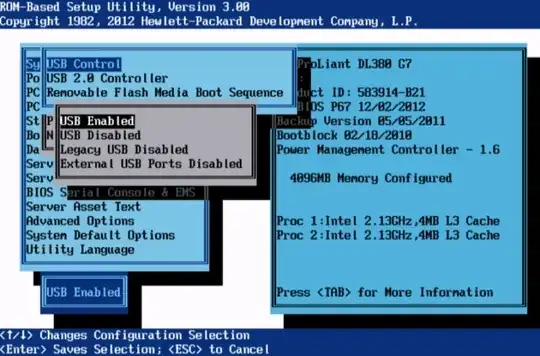
USB Boot Support USB Boot Support controls whether the system boots from USB devices connected to the server. When disabled, this option also disables booting of iLO virtual media. Options include:

• Enabled (default)
• Disabled

enter image description here

Booting from USB device:

  • Try with front and rear USB ports in the server.
  • Booting into a External USB hard drive may not be supported.
  • Avoid using USB hub while tring to boot.
  • Make sure USB key has bootable files.
ewwhite
  • 201,205
0

Using one of the two front side USB connectors over one of the four USB connectors on the back side of the ProLiant DL380e server, improves the boot from USB DVD drive reliability to near 100%.

Pro Backup
  • 1,024