4

I'm working on an Exchange 2013 CU6 installation at a site whose AD was comprised of two Windows 2003 domain controllers (in an odd HA cluster configuration).

New Windows 2012 R2 DCs have been added, and the necessary roles migrated. The 2003 systems have not been demoted yet, so the Forest/Domain functional level is still 2003.

My issue is that the the Exchange 2013 installer process fails with:

Setup encountered a problem while validating the state of Active Directory: Couldn't find the Enterprise Organization container.

The error links to a Microsoft article that isn't quite relevant to the situation. This environment never had an Exchange server, so there aren't any artifacts left over from previous installations/attempts.

A look at ADSIEdit confirms this.

The full setup log entries are as follows:

10/16/2014 20:27:36.0204 Failed [Rule:AdInitErrorRule] [Message:Setup encountered a problem while validating the state of Active Directory: Couldn't find the Enterprise Organization container. See the Exchange setup log for more information on this error.]

10/16/2014 20:27:36.0204 [REQUIRED] Setup encountered a problem while validating the state of Active Directory: Couldn't find the Enterprise Organization container. See the Exchange setup log for more information on this error.

DC replication appears healthy, DNS and AD Sites and Services are configured properly. None of the usual Exchange Setup switches work (/prepareSchema, /prepareAD). Everything fails with the same error.
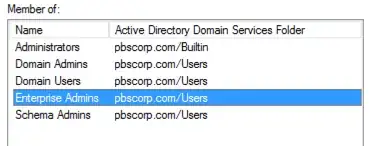
enter image description here

Any thoughts on how to proceed?

ewwhite
  • 201,205

4 Answers4

3

A suppose the answer here was a bit of voodoo...

Some sick combination of trawling German-language Microsoft forums, digging through errors and Googling/Binging/Altavista-ing... produced:

  • leaving/rejoining the Exchange server to the domain.
  • working with a new clean account with the right group membership (couldn't trust the existing Administrator account)
  • double/triple-checking replication and AD Sites/Services status.
  • trying an older Exchange Cumulative Update revision... CU5 instead of CU6.
  • updating the Forest/Domain functional level.

Given that cocktail of steps, the issue seems to be resolved...

ewwhite
  • 201,205
1

I installed Exchange 2013 on Server 2012R2 and messed up the receive connectors after already making group and users. I downed that server (turned it off) and installed another, not realizing that the new machine would take information from Active Directory (AD).

I then removed the first server information from AD through the ADSIedit.msc program because multiple posts said that was the way to totally delete that particular "dead" server (found under Configuration/CN:Configuration,DC:your-org-name,DC:Your-dot-com,net, local/CN=Services/CN=Microsoft Exchange AND CN=Microsoft Exchange Autodiscover to be exact).

There was still relic information stuck in there, so I uninstalled Exchange from the second server as well, hoping that would clean it up. I went back to ADSIedit.msc and totally deleted the keys that had Exchange in them as others had posted.

I still could not run "prepareAD" to reinstall Exchange 2013 due to this same error of it not finding the Enterprise Organization. I double checked all DNS information, account permissions, left and rejoined the domain, etc. I even tried to run the Exchange 2007 install as suggested way to clean up leftover AD issues due to deleting all of those Exchange organization attributes, but nothing worked. I am absolutely sure that all of the listed fixes published do, in fact, solve similar problems for the users. I just has a unique corner case.

I then found this article http://www.itguydiaries.net/2012/12/setup-encountered-problem-while.html that showed another place to delete the Exchange server information from AD by going to Users and Computers Advanced Features view, and that worked. There must have been a pointer in that leftover folder that pointed to a place that I had deleted, instead of the system finding nothing and then creating its own setup.

I finally found a similar solution here: https://community.spiceworks.com/topic/314077-cannot-install-exchagne-2013-on-server-2012. Maybe the misspelling left if off of my previous searches.

Sure would be nice if ADSIedit.msc would also clean up the Users and Computers key that shares the same name!!! :)

0

I recently ran into this issue when attempting to install Exchange Server 2013 into an environment that previously had Exchange Server 2010.

I found the following site very helpful in resolving the issue as they had pinpointed the fix for this error.

http://exchangeserverpro.com/exchange-server-2013-setup-fails-error-couldnt-find-enterprise-organization-container/

The resultant fix was the following.

The solution is to re-run setup for the previous version of Exchange to prepare Active Directory again. There is no need to fully install a server, simply preparing Active Directory should be enough.

If you had Exchange Server installed prior then run the following while replacing "Organization Name" with your own Organization Name.

(This is run using PowerShell from the Exchange 20## source files)

./Setup /PrepareAD /ON: "Organization Name"

Credit and thanks are due to Paul Cunningham at the mentioned site.